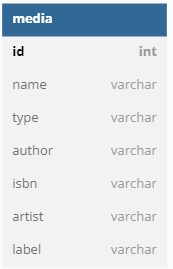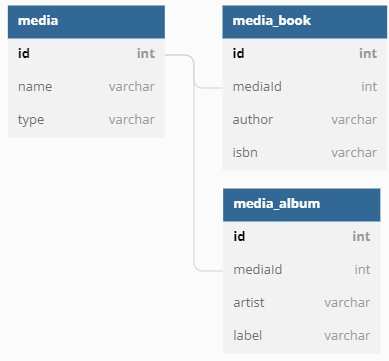
By default, Quick supports basic component-level inheritance of entities, meaning that a child component inherits the properties ( and ability to overload ) its parent. A common, object-oriented relational database pattern, however is to provide additional definition on parent tables ( and classes ) within child tables which contain a foreign key.
Quick supports two types of child classes: Discriminated and Subclassed child entities. In both cases, loading any child class will also deliver the data of its parent class.
Let's say, for example, that I have a Media entity, which is used to catalog and organize all media items loaded in to my application.
My Media entity contains all of the properties which are common to every media item uploaded in to my application. Let's say, however, that I need to have specific attributes that are available on only media for my Book entity ( e.g. whether the image is the cover photo, for example ). I can create a child class of BookMedia which extends my Media entity. When loaded, all of the properties of Media will be loaded along with the custom attributes which apply to my BookMedia object:
Note the additional component attribute joincolumn. The presence of this attribute on a child class signifies that it is a child entity of the parent and that the parent's properties should be loaded whenever the BookMedia entity is loaded. In addition, the primary key of the entity is that of the parent.
Child entities can be retrieved by queries specific to their own properties:
Or properties on the parent class can be used as first-class properties within the query:
Child entities can be retrieved, individually, using the value of the joinColumn, which should be a foreign key to the parent identifier column:
Now my Book entity can use its extended media class to retrieve media items which are specific to its own purpose:
A discriminated child class functions, basically, in the same way as a subclassed entity, with one exception: The parent entity is aware of the discriminated child due to a discriminatorValue attribute and will return a specific subclass when a retrieval is performed through the parent Entity. This pattern is also known as polymorphic association.
Quick supports two different types of discriminated entities defined by single-table inheritance (STI) or multi-table inheritance (MTI). Your database schema will determine the most appropriate inheritance pattern for your use case.
Let's take our BookMedia class again, but this time, define it as a discriminated entity.
The first step is to add the discriminatorColumn attribute to the Media entity, which is used to differentiate the subclass entities. Next, define an array of possible discriminated entities for the parent. This is so we don't have to scan all Quick components just to determine if there are any discriminated entities.
Then we set a discriminatorValue property on the child class, the value of which is stored in the parent entity table, which differentiates the different subclasses.
Then we set a discriminatorValue property on the child class, the value of which is stored in the parent entity table:
We aren’t entirely done yet. Finally, we must tell Quick whether we are using multi-table inheritance or single-table inheritance so it can map the database data to the subclass entities.
If the data for your discriminated entities is normalized across multiple tables, you should use the multi-table inheritance (MTI) method for creating discriminated entities. In the example below, The Media entity has two subclasses, MediaBook and MediaAlbum. The discriminator column for the entities is the type column in the media table and the distinct properties for each subclass come from the media_book and media_album tables.
To inform Quick that our database schema follows the MTI pattern, we must add a joinColumn and table values for each subclass.
If the data for your discriminated entities lives in a single table, you should use the single-table inheritance (STI) method for creating discriminated entities. In the example below, the Media entity has two subclasses, MediaBook and MediaAlbum. The discriminator column for the entities is the type column in the media table, and the distinct properties for each subclass come from a single table.
To inform Quick that our database schema follows the STI pattern, we must also add singleTableInheritance=true to the parent entity.
Once the parent and child entities are defined, new BookMedia entities will be saved with a type value of "book" in the media table. As such, the following query will result in only entities of BookMedia being returned:
If our Media table contains a combination of non-book and book media, then the collection returned when querying all records will contain a mix of Media entities such as BookMedia and AlbumMedia
If you want to create a brand-new entity of a specific subclass, you can do so by calling newChildEntity( discriminatorValue ) like this:
Discriminated and child class entities, allow for a more Object oriented approach to entity-specific relationships by allowing you to eliminate pivot/join tables and extend the attributes of the base class.
component
    table="media"
    extends="quick.models.BaseEntity"
    accessors="true"
{

    property name="id";
    property name="uploadFileName";
    property name="fileLocation";
    property name="fileSizeBytes";

}component
extends="Media"
table="book_media"
joinColumn="FK_media"
accessors="true"
{
property name="displayOrder";
property name="designation";
function approvalStatus(){
return belongsTo( "Book", "FK_book" );
}
}var coverPhotos = getInstance( "BookMedia" )
.where( "designation", "cover" )
.orderBy( "displayOrder", "ASC" );var smallCoverPhotos = getInstance( "BookMedia" )
.where( "designation", "cover" )
.where( "fileSizeBytes", "<", 40000 )
.orderBy( "displayOrder", "ASC" )
.orderBy( "uploadFileName", "ASC" );var myBookMediaItem = getInstance( "BookMedia" ).get( myId );function media(){
return hasMany( "BookMedia", "FK_book" ).orderBy( "displayOrder", "ASC" );
}// Media (parent entity)
component
extends="quick.models.BaseEntity"
accessors="true"
table="media"
discriminatorColumn="type" // the database column that determines the subclass
{
property name="id";
property name="uploadFileName";
property name="fileLocation";
property name="fileSizeBytes";
// Array of all possible subclass entities
variables._discriminators = [
"BookMedia"
];
}// BookMedia (subclass)
component
extends="Media"
accessors="true"
discriminatorValue="book" // column value unique to this subclass
{
property name="displayOrder";
property name="designation";
}// BookMedia (subclass entity using MTI)
component
extends="Media"
table="media_book" // table for BookMedia data
joinColumn="mediaId" // column to join on
accessors="true"
{// Media (parent entity)
component
extends="quick.models.BaseEntity"
accessors="true"
table="media"
discriminatorColumn="type"
singleTableInheritance="true" // Enable STI
{var bookMedia = getInstance( "Media" ).where( "type", "book" ).get();var allMedia = getInstance( "Media" ).all();var newBookMedia = getInstance( "Media" ).newChildEntity( "BookMedia" );To get started with Quick, you need an entity. You start by extending quick.models.BaseEntity.
That's all that is needed to get started with Quick. There are a few defaults of Quick worth mentioning here.
You can generate Quick entities from CommandBox! Install quick-commands and use quick entity create to get started!
We don't need to tell Quick what table name to use for our entity. By default, Quick uses the pluralized, snake_cased name of the component for the table name. That means for our User entity Quick will assume the table name is users. For an entity with multiple words like PasswordResetToken the default table would be password_reset_tokens. You can override this by specifying a table metadata attribute on the component.
For more information on using inheritance and child tables in your relational database model, see .
By default, Quick assumes a primary key of id. The name of this key can be configured by setting variables._key in your component.
Quick also assumes a key type that is auto-incrementing. If you would like a different key type, override thekeyType function and return the desired key type from that function.
Quick ships with the following key types:
AutoIncrementingKeyType
NullKeyType
ReturningKeyType
keyType can be any component that adheres to the keyType interface, so feel free to create your own and distribute them via ForgeBox.
Quick also supports compound or composite keys as a primary key. Define your variables._key as an array of the composite keys:
You specify what attributes are retrieved by adding properties to your component.
Now, only the id, username, and email attributes will be retrieved.
Make sure to include the primary key (id by default) as a property.
To prevent Quick from mapping a property to a database column add the persistent="false" attribute to the property. This is needed mostly when using dependency injection.
If the column name in your table is not the column name you wish to use in Quick, you can specify the column name using the column metadata attribute. The attribute will be available using the name of the attribute.
To work around CFML's lack of null, you can use the nullValue and convertToNull attributes.
nullValue defines the value that is considered null for a attribute. By default it is an empty string. ("")
convertToNull is a flag that, when false, will not try to insert null in to the database. By default this flag is true.
The readOnly attribute will prevent setters, updates, and inserts to a attribute when set to true.
In some cases you will need to specify an exact SQL type for your attribute. Any value set for the sqltype attribute will be used when inserting or updating the attribute in the database. It will also be used when you use the attribute in a where constraint.
The casts attribute allows you to use a value in your CFML code as a certain type while being a different type in the database. A common example of this is a boolean which is usually represented as a BIT in the database.
Two casters ship with Quick: BooleanCast@quick and JsonCast@quick. You can add them using those mappings to any applicable columns.
The casts attribute must point to a WireBox mapping that resolves to a component that implements the quick.models.Casts.CastsAttribute interface. (The implements keyword is optional.) This component defines how to get a value from the database in to the casted value and how to set a casted value back to the database. Below is an example of the built-in BooleanCast, which comes bundled with Quick.
Casted values are lazily loaded and cached for the lifecycle of the component. Only cast values that have been loaded will have set called on them when persisting to the database.
Casts can be composed of multiple fields as well. Take this Address value object, for example:
This component is not a Quick entity. Instead it represents a combination of fields stored on our User entity:
Noticed that the casted address is neither persistent nor does it have a getter or setter created for it.
The last piece of the puzzle is our AddressCast component that handles casting the value to and from the native database values:
You can see that returning a struct of values from the set function assigns multiple attributes from a single cast.
You can prevent inserting and updating a property by setting the insert or update attribute to false.
Quick handles formula, computed, or subselect properties using query scopes and the addSubselect helper method.
Quick uses a default datasource and default grammar, as described . If you are using multiple datasources you can override default datasource by specifying a datasource metadata attribute on the component. If your extra datasource has a different grammar you can override your grammar as well by specifying a grammar attribute.
At the time of writing Valid grammar options are: MySQLGrammar@qb, PostgresGrammar@qb, SqlServerGrammar@qb and OracleGrammar@qb. Please check the for additional options.
You can compare entities using the isSameAs and isNotSameAs methods. Each method takes another entity and returns true if the two objects represent the same entity.
// User.cfc
component extends="quick.models.BaseEntity" accessors="true" {}
UUIDKeyType
RowIDKeyType
// User.cfc
component table="t_users" extends="quick.models.BaseEntity" accessors="true" {}// User.cfc
component extends="quick.models.BaseEntity" accessors="true" {
variables._key = "user_id";
}// User.cfc
component extends="quick.models.BaseEntity" accessors="true" {
function keyType() {
return variables._wirebox.getInstance( "UUIDKeyType@quick" );
}
}interface displayname="KeyType" {
/**
* Called to handle any tasks before inserting into the database.
* Recieves the entity as the only argument.
*/
public void function preInsert( required entity );
/**
* Called to handle any tasks after inserting into the database.
* Recieves the entity and the queryExecute result as arguments.
*/
public void function postInsert( required entity, required struct result );
}// PlayingField.cfc
component extends="quick.models.BaseEntity" accessors="true" {
property name="fieldID";
property name="clientID";
property name="fieldName";
variables._key = [ "fieldID", "clientID" ];
function keyType() {
return variables._wirebox.getInstance( "NullKeyType@quick" );
}
}// User.cfc
component extends="quick.models.BaseEntity" accessors="true" {
property name="id";
property name="username";
property name="email";
}// User.cfc
component extends="quick.models.BaseEntity" accessors="true" {
property name="bcrypt" inject="@BCrypt" persistent="false";
property name="id";
property name="username";
property name="email";
}component extends="quick.models.BaseEntity" accessors="true" {
property name="id";
property name="username" column="user_name";
property name="countryId" column="FK_country_id";
}component extends="quick.models.BaseEntity" accessors="true" {
property name="id";
property name="number" convertToNull="false";
property name="title" nullValue="REALLY_NULL";
}component extends="quick.models.BaseEntity" accessors="true" {
property name="id";
property name="createdDate" readonly="true";
}component extends="quick.models.BaseEntity" accessors="true" {
property name="id";
property name="number" sqltype="cf_sql_varchar";
}// User.cfc
component extends="quick.models.BaseEntity" accessors="true" {
property name="id";
property name="active" casts="BooleanCast@quick";
}// BooleanCast.cfc
component implements="CastsAttribute" {
/**
* Casts the given value from the database to the target cast type.
*
* @entity The entity with the attribute being casted.
* @key The attribute alias name.
* @value The value of the attribute.
*
* @return The casted attribute.
*/
public any function get(
required any entity,
required string key,
any value
) {
return isNull( arguments.value ) ? false : booleanFormat( arguments.value );
}
/**
* Returns the value to assign to the key before saving to the database.
*
* @entity The entity with the attribute being casted.
* @key The attribute alias name.
* @value The value of the attribute.
*
* @return The value to save to the database. A struct of values
* can be returned if the cast value affects multiple attributes.
*/
public any function set(
required any entity,
required string key,
any value
) {
return arguments.value ? 1 : 0;
}
}// Address.cfc
component accessors="true" {
property name="streetOne";
property name="streetTwo";
property name="city";
property name="state";
property name="zip";
function fullStreet() {
var street = [ getStreetOne(), getStreetTwo() ];
return street.filter( function( part ) {
return !isNull( part ) && part != "";
} ).toList( chr( 10 ) );
}
function formatted() {
return fullStreet() & chr( 10 ) & "#getCity()#, #getState()# #getZip()#";
}
}component extends="quick.models.BaseEntity" accessors="true" {
property name="id";
property name="username";
property name="firstName" column="first_name";
property name="lastName" column="last_name";
property name="password";
property name="address"
casts="AddressCast"
persistent="false"
getter="false"
setter="false";
property name="streetOne";
property name="streetTwo";
property name="city";
property name="state";
property name="zip";
}component implements="quick.models.Casts.CastsAttribute" {
property name="wirebox" inject="wirebox";
/**
* Casts the given value from the database to the target cast type.
*
* @entity The entity with the attribute being casted.
* @key The attribute alias name.
* @value The value of the attribute.
* @attributes The struct of attributes for the entity.
*
* @return The casted attribute.
*/
public any function get(
required any entity,
required string key,
any value
) {
return wirebox.getInstance( dsl = "Address" )
.setStreetOne( entity.retrieveAttribute( "streetOne" ) )
.setStreetTwo( entity.retrieveAttribute( "streetTwo" ) )
.setCity( entity.retrieveAttribute( "city" ) )
.setState( entity.retrieveAttribute( "state" ) )
.setZip( entity.retrieveAttribute( "zip" ) );
}
/**
* Returns the value to assign to the key before saving to the database.
*
* @entity The entity with the attribute being casted.
* @key The attribute alias name.
* @value The value of the attribute.
* @attributes The struct of attributes for the entity.
*
* @return The value to save to the database. A struct of values
* can be returned if the cast value affects multiple attributes.
*/
public any function set(
required any entity,
required string key,
any value
) {
return {
"streetOne": arguments.value.getStreetOne(),
"streetTwo": arguments.value.getStreetTwo(),
"city": arguments.value.getCity(),
"state": arguments.value.getState(),
"zip": arguments.value.getZip()
};
}
}component extends="quick.models.BaseEntity" accessors="true" {
property name="id";
property name="email" column="email" update="false" insert="true";
}// User.cfc
component
datasource="myOtherDatasource"
grammar="PostgresGrammar@qb"
extends="quick.models.BaseEntity"
accessors="true"
{
// ....
}var userOne = getInstance( "User" ).findOrFail( 1 );
var userTwo = getInstance( "User" ).findOrFail( 1 );
userOne.isSameAs( userTwo ); // true
userOne.isNotSameAs( userTwo ); // false