
Loading...
Loading...
Loading...
Loading...
Loading...
Loading...
Loading...
Loading...
Loading...
Loading...
Loading...
Loading...
Loading...
Loading...
Loading...
Loading...
Loading...
Loading...
Loading...
Loading...
Loading...
Loading...
Loading...
Loading...
Loading...
Loading...
Loading...
Loading...
Loading...
Loading...
Loading...
Loading...
Loading...
Loading...
Loading...
Loading...
Loading...
Loading...
Loading...
Loading...
Loading...
Relationships are the heart of any ORM engine. They let you interact with relational database tables in an object-oriented way.
Quick's relationship engine provides readable relationship types, extendible relations at runtime, eager loading, and much more.
Start by checking out the different relationship types.
The following are the module settings for Quick:
settings = {
"defaultGrammar" : "AutoDiscover@qb",
"defaultQueryOptions" : {},
"preventDuplicateJoins" : true,
"metadataCache" : {
"name" : "quickMeta",
"provider" : "coldbox.system.cache.providers.CacheBoxColdBoxProvider",
"properties" : {
"objectDefaultTimeout" : 0, // no timeout
"useLastAccessTimeouts" : false, // no last access timeout
"maxObjects" : 300,
"objectStore" : "ConcurrentStore"
}
}
};No parameters
A loaded entity has a tie to the database. It has either been loaded from the database or saved to the database. An unloaded entity is one created in code but not saved to the database yet.
Clones the entity and returns an exact copy of the entity.
markLoaded
boolean
false
false
Mark the returned entity as loaded or not
Clones an entity and return an exact copy of the entity. This returned object is a new and separate instance from the original object.
var user = getInstance( "User" );
user.isLoaded(); // false
user.save();
user.isLoaded(); // truevar user = getInstance( "User" );
var clonedUser = user.clone();You might be thinking, I don't need an ORM engine. I don't even know what ORM means! I know SQL backwards and forwards so there's nothing an ORM can offer me. Maybe you've had experience with other ORM engines, whether CFML-based or not, and the experience was less that ideal. Why should you consider Quick?
Quick's ORM philosophy comes down to three main points:
Give relevant names to important collections of SQL code. (, , etc.)
Make queries easy to compose at runtime to get the exact data you want in the most efficient way (, , etc.)
Get out of your way when you need or want to write barebones SQL.
Quick was built out of lessons learned and persistent challenges in developing complex RDBMS applications using built-in Hibernate ORM in CFML.
Hibernate ORM error messages often obfuscate the actual cause of the error
because they are provided directly by the Java classes.
Complex CFML Hibernate ORM applications can consume significant memory and
processing resources, making them cost-prohibitive and inefficient when used
in microservices architecture.
We can do better.
Relationship Types
You can delete an entity by calling the delete method on it.
var user = getInstance( "User" ).find( 1 );
user.delete();The entity will still exist in any variables you have stored it in, even though it has been deleted from the database.
Just like updateAll, you can delete many records from the database by specifying a query with constraints and then calling the deleteAll method.
Deletes matching entities according to the configured query.
Additionally, you can pass in an array of ids to deleteAll to delete only those ids. Note that any previously configured constraints will still apply.
infrequently and may be costly for non-OSS engine users.
Hibernate ORM is built in Java. This limits contributions from CFML
developers who don't know Java or don't feel comfortable contributing to a
Java project.
Hibernate ORM doesn't take advantage of a lot of dynamic- and
meta-programming available in CFML. (Tools like CBORM have helped to bridge
this gap.)
Name
Type
Required
Default
Description
ids
array
false
[]
An optional array of ids to add to the previously configured query. The ids will be added to a WHERE IN statement on the primary key columns.
getInstance( "User" )
.whereActive( false )
.deleteAll();getInstance( "User" ).deleteAll( [ 4, 10, 22 ] );qb is the engine that powers Quick. It is highly recommended that you become familiar with the qb documentation.
You can do this any way you'd like: through the web admin, in Application.cfc, or using .
Make sure to set this.datasource in your Application.cfc so Quick knows which datasource to use.
The easiest way to download Quick is to use ForgeBox with CommandBox. Just run the following from the root of your application:
box install quick
quick in your Application.cfcFor a default installation in a ColdBox template, the following line will do the trick.
this.mappings[ "/quick" ] = COLDBOX_APP_ROOT_PATH & "/modules/quick";
defaultGrammar in config/ColdBox.cfcQuick will auto discover your grammar by default on startup. To avoid this check, set a BaseGrammar.
defaultGrammar is a module setting for Quick. Set it in your config/ColdBox.cfc like so:
Valid options are any of the . At the time of writing valid grammar options are: MySQLGrammar@qb, PostgresGrammar@qb, SqlServerGrammar@qb and OracleGrammar@qb. You can also have qb discover your grammar on application init using AutoDiscover@qb. Please check the qb docs for additional options.
If you want to use a different datasource and/or grammar for individual entitities you can do so by attributes to your entities.
Sometimes you want to use a different value in your code than is stored in your database. Perhaps you want to enforce that setting a password always is hashed with BCrypt. Maybe you have a Date value object that you want wrapping each of your dates. You can accomplish this using custom getters and setters.
A custom getter or setter is simply a function in your entity.
To retrieve the attribute value fetched from the database, call retrieveAttribute passing in the name of the attribute.
To set an attribute for saving to the database, call assignAttribute passing in the name and the value.
Custom getters and setters with
The cookbook is a place to show examples of using Quick in practice. Each cookbook entry will include a short description of the problem to solve or use case and one or more code snippets showing the code.
The cookbook is not meant to teach you the basics of Quick or show you the method signatures. That is the purpose of the Guide and API Docs, respectively. The cookbook is meant to show you advanced and specific use cases.
Additionally, this is a great place to contribute to Quick! If you have solved a particular use case, send in a pull request and add it to the cookbook! We only ask that you take the time to simplify your example as much as you can. This usually means removing any custom naming convention for your attributes, tables, and entities.
component extends="quick.models.BaseEntity" accessors="true" {
property name="bcrypt" inject="@BCrypt";
function setPassword( value ) {
return assignAttribute( "password", bcrypt.hashPassword( value ) );
}
function getCreatedDate( value ) {
return dateFormat( retrieveAttribute( "createdDate" ), "DD MMM YYYY" );
}
}moduleSettings = {
quick = {
defaultGrammar = "MySQLGrammar@qb"
}
};UserProfileuserIdIf your parent entity does not use id as its primary key, or you wish to join the child entity to a different column, you may pass a third argument to the hasOne method specifying your parent table's custom key.
The inverse of hasOne is belongsTo. It is important to choose the right relationship for your database structure. hasOne assumes that the related model has the foreign key for the relationship.
HasOne relationships can be configured to return a default entity if no entity is found. This is done by calling withDefault on the relationship object.
Called this way will return a new unloaded entity with no data. You can also specify any default attributes data by passing in a struct of data to withDefault.
Name
Type
Required
Default
Description
relationName
string
true
The WireBox mapping for the related entity.
foreignKey
String | [String]
false
entityName() & keyNames()
Returns a HasOne relationship between this entity and the entity defined by relationName.
To assist you in migrating from CBORM, Quick ships with a small compatibility shim. To use it, have your entity extend quick.models.CBORMCompatEntity. This will map common CBORM methods to their Quick counterparts as well as provide a partial CriteriaBuilder shim. The compatibility shim does not cover differences in properties or relationships.
list
// User.cfc
component extends="quick.models.BaseEntity" accessors="true" {
function profile() {
return hasOne( "UserProfile" );
}
}return hasOne( "UserProfile", "FK_userID" );return hasOne( "UserProfile", "FK_userID", "profile_id" );// UserProfile.cfc
component extends="quick.models.BaseEntity" accessors="true" {
function user() {
return belongsTo( "User" );
}
}// User.cfc
component extends="quick.models.BaseEntity" accessors="true" {
function profile() {
return hasOne( "UserProfile" ).withDefault();
}
}// User.cfc
component extends="quick.models.BaseEntity" accessors="true" {
function profile() {
return hasOne( "UserProfile" ).withDefault( {
"showHints": true
} );
}
}countWhere
deleteById
deleteWhere
exists
findAllWhere
findWhere
get
getAll
new
populate
save
saveAll
newCriteria
getSQL
between
eqProperty
isEQ
isGT
gtProperty
isGE
geProperty
idEQ
like
ilike
isIn
isNull
isNotNull
isLT
ltProperty
neProperty
isLE
leProperty
maxResults
firstResult
order
list
get
count
onMissingMethod
Post entity is assumed to have a userId foreign key. You can override this by passing a foreign key in as the second argument:If your parent entity does not use id as its primary key, or you wish to join the child entity to a different column, you may pass a third argument to the belongsTo method specifying your parent table's custom key.
To update a belongsTo relationship, use the associate method. associate takes the entity to associate as the only argument.
associate does not automatically save the entity. Make sure to call save when you are ready to persist your changes to the database.
To remove a belongsTo relationship, use the dissociate method.
dissociate does not automatically save the entity. Make sure to call save when you are ready to persist your changes to the database.
You can also influence the associated entities by calling "set" & relationshipName and passing in an entity or key value.
After executing this code, the post would be updated in the database to be associated with the user with an id of 1.
BelongsTo relationships can be configured to return a default entity if no entity is found. This is done by calling withDefault on the relationship object.
Called this way will return a new unloaded entity with no data. You can also specify any default attributes data by passing in a struct of data to withDefault.
Name
Type
Required
Default
Description
relationName
string
true
The WireBox mapping for the related entity.
foreignKey
String | [String]
false
entityName() & keyNames()
Returns a BelongsTo relationship between this entity and the entity defined by relationName.
Hibernate ORM error messages often obfuscate the actual cause of the error
because they are provided directly by the Java classes.
Complex CFML Hibernate ORM applications can consume significant memory and
processing resources, making them cost-prohibitive and inefficient when used
in microservices architecture.
Hibernate ORM is tied to the engine releases. This means that updates come
infrequently and may be costly for non-OSS engine users.
Hibernate ORM is built in Java. This limits contributions from CFML
developers who don't know Java or don't feel comfortable contributing to a
Java project.
Hibernate ORM doesn't take advantage of a lot of dynamic- and
meta-programming available in CFML. (Tools like CBORM have helped to bridge
this gap.)
We can do better.
Quick is an ORM (Object Relational Mapper) written in CFML for CFML. It provides an ActiveRecord implementation for working with your database. With it you can map database tables to components, create relationships between components, query and manipulate data, and persist all your changes to your database.
You need the following configured before using Quick:
Configure a default datasource in your CFML engine
ColdBox 4.3+
Add a mapping for quick in your Application.cfc
Configure your BaseGrammar in config/ColdBox.cfc
See Getting Started for more details.
Quick supports all databases supported by qb.
Here's a "quick" example to whet your appetite.
We'll show the database structure using a migrations file. This isn't required to use quick, but it is highly recommended.
Now that you've seen an example, dig in to what you can do with Quick!
Quick is backed by qb. Without qb, there is no Quick.
Quick is inspired heavily by Eloquent in Laravel. Thank you Taylor Otwell and the Laravel community for a great library.
Development of Quick is sponsored by Ortus Solutions. Thank you Ortus Solutions for investing in the future of CFML.
The Box products community for further discussion and help can be found here: https://community.ortussolutions.com/c/communities/quick-orm/23
The foreign key on the parent entity.
localKey
String | [String]
false
keyNames()
The local primary key on the parent entity.
relationMethodName
String
false
The method name called on the entity to produce this relationship.
The method name called to retrieve this relationship. Uses a stack backtrace to determine by default.
<b></b>
DO NOT PASS A VALUE HERE UNLESS YOU KNOW WHAT YOU ARE DOING.
A hasMany relationship is a one-to-many relationship. For instance, a User may have multiple Posts.
The first value passed to hasMany is a WireBox mapping to the related entity.
Quick determines the foreign key of the relationship based on the entity name and key values. In this case, the Post entity is assumed to have a userId foreign key. You can override this by passing a foreign key in as the second argument:
If your parent entity does not use id as its primary key, or you wish to join the child entity to a different column, you may pass a third argument to the hasMany method specifying your parent table's custom key.
The inverse of hasMany is .
There are two ways to add an entity to a hasMany relationship. Both mirror the for entities.
You can call the save method on the relationship passing in an entity to relate.
This will add the User entity's id as a foreign key in the Post and save the Post to the database.
Note: the
savemethod is called on thepostsrelationship, not thegetPostscollection.
You can also add many entities in a hasMany relationship by calling saveMany. This method takes an array of key values or entities and will associate each of them with the base entity.
Use the create method to create and save a related entity directly through the relationship.
This example will have the same effect as the previous example.
Removing a hasMany relationship is handled in two ways: either by using the dissociate method on the side of the relationship or by deleting the side of the relationship.
You can also influence the associated entities by calling "set" & relationshipName and passing in an array of entities or key values.
After running this code, this user would only have two posts, the posts with ids 2 and 4. Any other posts would now be disassociated with this user. Likely your database will be guarding against creating these orphan records. Admittedly, this method is not as likely to be used as the others, but it does exist if it solves your use case.
Returns a HasMany relationship between this entity and the entity defined by relationName.
Collections are what are returned when calling get or all on an entity. By default, it returns an array. Every entity can override its newCollection method and return a custom collection. This method accepts an array of entities and should return your custom collection.
QuickCollection is a custom collection included in Quick as an extra component. It is a specialized version of CFCollection. It smooths over the various CFML engines to provide an extendible, reliable array wrapper with functional programming methods. You may be familiar with methods like map (ArrayMap), filter (ArrayFilter), or reduce (ArrayReduce). These methods work in every CFML engine with CFCollection.
To use collections you need to install cfcollection and configure it as your as your newCollection.
Here's how you would configure an entity to return a QuickCollection.
Collections are more powerful than plain arrays. There are many methods that can make your work easier. For instance, let's say you needed to group each active user by the first letter of their username in a list.
So powerful! We think you'll love it.
Additionally, QuickCollection includes a load method. load lets you eager load a relationship after executing the initial query.
This is the same as if you had initially executed:
QuickCollection includes a $renderData method that lets you return a QuickCollection directly from your handler and translates the results and the entities within to a serialized version. Check out more about it in the chapter.
By default, Quick supports basic component-level inheritance of entities, meaning that a child component inherits the properties ( and ability to overload ) its parent. A common, object-oriented relational database pattern, however is to provide additional definition on parent tables ( and classes ) within child tables which contain a foreign key.
Quick supports two types of child classes: Discriminated and Subclassed child entities. In both cases, loading any child class will also deliver the data of its parent class.
Let's say, for example, that I have a Media entity, which is used to catalog and organize all media items loaded in to my application.
// Post.cfc
component extends="quick.models.BaseEntity" accessors="true" {
function user() {
return belongsTo( "User" );
}
}return belongsTo( "User", "FK_userID" );return belongsTo( "User", "FK_userID", "relatedPostId" );// User.cfc
component extends="quick.models.BaseEntity" accessors="true" {
function posts() {
return hasMany( "Post" );
}
function latestPost() {
// remember, relationships are just queries!
return hasOne( "Post" ).orderBy( "createdDate", "desc" );
}
}var post = getInstance( "Post" ).findOrFail(1);
var user = getInstance( "User" ).findOrFail(1);
post.user().associate( user );
post.save();var post = getInstance( "Post" ).findOrFail(1);
post.user().dissociate();
post.save();var post = getInstance( "Post" ).first();
post.setAuthor( 1 );// Post.cfc
component extends="quick.models.BaseEntity" accessors="true" {
function user() {
return belongsTo( "User" ).withDefault();
}
}// Post.cfc
component extends="quick.models.BaseEntity" accessors="true" {
function user() {
return belongsTo( "User" ).withDefault( {
"firstName": "Guest",
"lastName": "Author"
} );
}
}// 2017_11_10_122835_create_users_table.cfc
component {
function up() {
schema.create( "users", function( table ) {
table.increments( "id" );
table.string( "username" ).unique();
table.string( "email" ).unique();
table.string( "password" );
table.timestamp( "createdDate" );
table.timestamp( "updatedDate" );
} );
}
}// User
component extends="quick.models.BaseEntity" {
// the name of the table is the pluralized version of the model
// all fields in a table are mapped by default
// both of these points can be configured on a per-entity basis
}// handlers/Users.cfc
component {
// /users/:id
function show( event, rc, prc ) {
// this finds the User with an id of 1 and retrieves it
prc.user = getInstance( "User" ).findOrFail( rc.id );
event.setView( "users/show" );
}
}<!-- views/users/show.cfm -->
<cfoutput>
<h1>Hi, #prc.user.getUsername()#!</h1>
</cfoutput>// User.cfc
component extends="quick.models.BaseEntity" accessors="true" {
function posts() {
return hasMany( "Post" );
}
}component name="User" {
function newCollection( array entities = [] ) {
return variables._wirebox.getInstance(
name = "quick.extras.QuickCollection",
initArguments = {
"collection" = arguments.entities
}
);
}
}var users = getInstance("User").all();
users
.filter(function(user) {
return user.getActive();
})
.pluck("username")
.groupBy(function(username) {
return left(username, 1);
});var posts = getInstance("Post").all();
if (someCondition) {
posts.load("user");
}getInstance("Post")
.with("user")
.all();The foreign key on the parent entity.
localKey
String | [String]
false
keyNames()
The local primary key on the parent entity.
relationMethodName
String
false
The method name called on the entity to produce this relationship.
The method name called to retrieve this relationship. Uses a stack backtrace to determine by default.
<b></b>
DO NOT PASS A VALUE HERE UNLESS YOU KNOW WHAT YOU ARE DOING.
relationName
string
true
The WireBox mapping for the related entity.
foreignKey
String | [String]
false
entityName() & keyNames()
Media entity contains all of the properties which are common to every media item uploaded in to my application. Let's say, however, that I need to have specific attributes that are available on only media for my Book entity ( e.g. whether the image is the cover photo, for example ). I can create a child class of BookMedia which extends my Media entity. When loaded, all of the properties of Media will be loaded along with the custom attributes which apply to my BookMedia object:Note the additional component attribute joincolumn. The presence of this attribute on a child class signifies that it is a child entity of the parent and that the parent's properties should be loaded whenever the BookMedia entity is loaded. In addition, the primary key of the entity is that of the parent.
Child entities can be retrieved by queries specific to their own properties:
Or properties on the parent class can be used as first-class properties within the query:
Child entities can be retrieved, individually, using the value of the joinColumn, which should be a foreign key to the parent identifier column:
Now my Book entity can use its extended media class to retrieve media items which are specific to its own purpose:
A discriminated child class functions, basically, in the same way as a subclassed entity, with one exception: The parent entity is aware of the discriminated child due to a discriminatorValue attribute and will return a specific subclass when a retrieval is performed through the parent Entity. This pattern is also known as polymorphic association.
Quick supports two different types of discriminated entities defined by single-table inheritance (STI) or multi-table inheritance (MTI). Your database schema will determine the most appropriate inheritance pattern for your use case.
Let's take our BookMedia class again, but this time, define it as a discriminated entity.
The first step is to add the discriminatorColumn attribute to the Media entity, which is used to differentiate the subclass entities. Next, define an array of possible discriminated entities for the parent. This is so we don't have to scan all Quick components just to determine if there are any discriminated entities.
Then we set a discriminatorValue property on the child class, the value of which is stored in the parent entity table, which differentiates the different subclasses.
Then we set a discriminatorValue property on the child class, the value of which is stored in the parent entity table:
We aren’t entirely done yet. Finally, we must tell Quick whether we are using multi-table inheritance or single-table inheritance so it can map the database data to the subclass entities.
If the data for your discriminated entities is normalized across multiple tables, you should use the multi-table inheritance (MTI) method for creating discriminated entities. In the example below, The Media entity has two subclasses, MediaBook and MediaAlbum. The discriminator column for the entities is the type column in the media table and the distinct properties for each subclass come from the media_book and media_album tables.
To inform Quick that our database schema follows the MTI pattern, we must add a joinColumn and table values for each subclass.
If the data for your discriminated entities lives in a single table, you should use the single-table inheritance (STI) method for creating discriminated entities. In the example below, the Media entity has two subclasses, MediaBook and MediaAlbum. The discriminator column for the entities is the type column in the media table, and the distinct properties for each subclass come from a single table.
To inform Quick that our database schema follows the STI pattern, we must also add singleTableInheritance=true to the parent entity.
Once the parent and child entities are defined, new BookMedia entities will be saved with a type value of "book" in the media table. As such, the following query will result in only entities of BookMedia being returned:
If our Media table contains a combination of non-book and book media, then the collection returned when querying all records will contain a mix of Media entities such as BookMedia and AlbumMedia
If you want to create a brand-new entity of a specific subclass, you can do so by calling newChildEntity( discriminatorValue ) like this:
Discriminated and child class entities, allow for a more Object oriented approach to entity-specific relationships by allowing you to eliminate pivot/join tables and extend the attributes of the base class.
The foreign key on the parent entity.
localKey
String | [String]
false
keyNames()
The local primary key on the parent entity.
relationMethodName
String
false
The method name called on the entity to produce this relationship.
The method name called to retrieve this relationship. Uses a stack backtrace to determine by default.
DO NOT PASS A VALUE HERE UNLESS YOU KNOW WHAT YOU ARE DOING.
Updates are handled identically to inserts when using the save method. The only difference is that instead of starting with a new entity, we start with an existing entity.
You can update multiple fields at once using the update method. This is similar to the create method for creating new entities.
There is no need to call save when using the update method.
By default, if you have a key in the struct that doesn't match a property in the entity the update method will fail. If you add the optional argument ignoreNonExistentAttributes set to true, those missing keys are ignored. Now you can pass the rc scope from your submitted form directly into the update method and not worry about any other keys in the rc like event that would cause the method to fail.
Updates an existing record or creates a new record with the given attributes.
Updates matching entities with the given attributes according to the configured query. This is analagous to
Retrieves a new entity from the database with the same key value as the current entity. Useful for seeing any changes made to the record in the database. This function executes a query.
Refreshes the attributes data for the entity with data from the database. This differs from fresh in that it operates on the current entity instead of returning a new one. This function executes a query.
One common type of subselect field is the count of related entites. For instance, you may want to load a Post or a list of Posts with the count of Comments on each Post. You can reuse your existing relationship definitions and add this count using the withCount method.
Adds a count of related entities as a subselect property. Relationships can be constrained at runtime by passing a struct where the key is the relationship name and the value is a function to constrain the query.
By default, you will access the returned count using the relationship name appended with Count, i.e. comments will be available under commentsCount.
You can alias the count attribute using the AS syntax as follows:
This is especially useful as you can dynamically constrain counts at runtime using the same struct syntax as eager loading with the with function.
Adds a sum of an attribute of related entities as a subselect property. Relationships can be constrained at runtime by passing a struct where the key is the relationship name and the value is a function to constrain the query.
By default, you will access the returned sum using the relationship name prepended with total, i.e. purchases.amount will be available under totalPurchases.
You can alias the count attribute using the AS syntax as follows:
This is especially useful as you can dynamically constrain counts at runtime using the same struct syntax as eager loading with the with function.
Contributed by Wil de Bruin
Often you will configure Quick with a default datasource, but in some cases you might need a dynamic datasource. For example, your killer app is multi-tenant, each customer has it's own database but the codebase is exactly the same for each customer. In this case you have two options:
Deploy the same app over and over again for each customer, which is only feasible for a small customer count.
or create some central authentication mechanisms, and after authentication each user gets his own
userId
Actually there are multiple solutions available - you just have to pick one which suits you best. After login you know which datasource you need. Since Quick needs to know where to get the value of your datasource you need to store it somewhere. We will store it in the private request collection (prc), but other options like session storage or user-specific caching might be preferable in your use case. So let's assume we have a variable called mainDatasource in our private request collection which has the datasource name we should use. We should be able to change the default datasource in every quick object just before it sends a query to the database.
Quick fires an instanceReady event internally and as an interceptor. We will hook in to this lifecycle event by creating a base component for our entities.
In this case, I use the instanceReady() lifecycle method which fires AFTER an object is created, but before data is loaded from the database. We get the datasource from the private request collection, and only take action if it is set. If there is a value, we change the _queryoptions on the builder object. Unfortunately this is not enough, because the _queryoptions will not be read again after instanceReadyfires, so we explicitly have to set the default options on the _builder object again. Once that's done, your Quick entity is ready to query using your dynamic datasource. So every Quick entity which inherits from our custom base component will use dynamic datasources
The newQuery method reads the default _queryOptions, and prepares a query object. We create a base component again and this time override the newQuery method.
In this scenario we read the dynamic datasource value from the prc again, and modify the _queryoptions to use that datasource. Once this is ready we can call the newQuery() method of the parent object to finish setting up. Again, if your Quick entity inherits from this base, your quick object will now be using dynamic datasources.
The third option might look simpler, but offers you less control. Quick uses qb to query the database, and just before it does this it announces a preQBExecute interception point. By creating and registering an interceptor, you can change your datasource just in time. The interceptor can look like this:
In this case you don't need your own base component. Be aware that this interceptor changes your datasource for ALL qb requests, no matter if you use custom base component or even if it is a regular qb query. So if qb already had some default datasource that will also be changed. We added an extra check, so this interceptor is not touching your qb query if a datasource was already explicitly defined. You can register your interceptor in the coldbox config like this
Option 2 is the most specific option you can use, and makes most sense if you see what happens in the newQuery method of quick.models.BaseEntity. Option 3 is less specific and might change your datasource in unwanted places. But if you know what you are doing it can be a very powerful way to add this dynamic datasource capability to Quick.
return hasMany( "Post", "FK_userID" );return hasMany( "Post", "FK_userID", "relatedPostId" );// Post.cfc
component extends="quick.models.BaseEntity" accessors="true" {
function user() {
return belongsTo( "User" );
}
}var post = getInstance( "Post" ).create( {
"title" = "My Post",
"body" = "Hello, world!"
} );
var user = getInstance( "User" ).findOrFail( 1 );
user.posts().save( post );
// OR use the keyValue
user.posts().save( post.keyValue() );var user = getInstance( "User" ).findOrFail( 1 );
user.posts().create( {
"title" = "My Post",
"body" = "Hello, world!"
} );var postA = getInstance( "Post" ).findOrFail( 2 );
user.setPosts( [ postA, 4 ] );component
table="media"
extends="quick.models.BaseEntity"
accessors="true"
{
property name="id";
property name="uploadFileName";
property name="fileLocation";
property name="fileSizeBytes";
}component
extends="Media"
table="book_media"
joinColumn="FK_media"
accessors="true"
{
property name="displayOrder";
property name="designation";
function approvalStatus(){
return belongsTo( "Book", "FK_book" );
}
}var coverPhotos = getInstance( "BookMedia" )
.where( "designation", "cover" )
.orderBy( "displayOrder", "ASC" );var smallCoverPhotos = getInstance( "BookMedia" )
.where( "designation", "cover" )
.where( "fileSizeBytes", "<", 40000 )
.orderBy( "displayOrder", "ASC" )
.orderBy( "uploadFileName", "ASC" );var myBookMediaItem = getInstance( "BookMedia" ).get( myId );function media(){
return hasMany( "BookMedia", "FK_book" ).orderBy( "displayOrder", "ASC" );
}// Media (parent entity)
component
extends="quick.models.BaseEntity"
accessors="true"
table="media"
discriminatorColumn="type" // the database column that determines the subclass
{
property name="id";
property name="uploadFileName";
property name="fileLocation";
property name="fileSizeBytes";
// Array of all possible subclass entities
variables._discriminators = [
"BookMedia"
];
}// BookMedia (subclass)
component
extends="Media"
accessors="true"
discriminatorValue="book" // column value unique to this subclass
{
property name="displayOrder";
property name="designation";
}// BookMedia (subclass entity using MTI)
component
extends="Media"
table="media_book" // table for BookMedia data
joinColumn="mediaId" // column to join on
accessors="true"
{// Media (parent entity)
component
extends="quick.models.BaseEntity"
accessors="true"
table="media"
discriminatorColumn="type"
singleTableInheritance="true" // Enable STI
{var bookMedia = getInstance( "Media" ).where( "type", "book" ).get();var allMedia = getInstance( "Media" ).all();var newBookMedia = getInstance( "Media" ).newChildEntity( "BookMedia" );var user = getInstance( "User" ).find( 1 );
user.setPassword( "newpassword" );
user.save();ignoreNonExistentAttributes
boolean
false
false
If true, does not throw an exception if an attribute does not exist. Instead, it skips the non-existent attribute.
Name
Type
Required
Default
Description
attributes
struct
false
{}
A struct of key / value pairs to update on the entity.
ignoreNonExistentAttributes
boolean
false
false
Name
Type
Required
Default
Description
attributes
struct
false
{}
A struct of attributes to restrict the query. If no entity is found the attributes are filled on the new entity created.
newAttributes
struct
false
{}
Name
Type
Required
Default
Description
attributes
struct
false
{}
The attributes to update on the matching records.
force
boolean
false
false
Name
Type
Required
Default
Description
No arguments
``
Name
Type
Required
Default
Description
No arguments
``
If true, does not throw an exception if an attribute does not exist. Instead, it skips the non-existent attribute.
A struct of attributes to update on the found entity or the new entity if no entity is found.
If true, skips read-only entity and read-only attribute checks.
Name
Type
Required
Default
Description
relation
any
true
A single relation name or array of relation names to load counts.
Name
Type
Required
Default
Description
relationMapping
any
true
A single relation mapping string (relationName.attributeName) or array of relation mappings to load as summed subselects.
customerDatasource
In this scenario you know from your user authentication info which datasource you should use for each customer. The problem: this datasource name is dynamic, while Quick knows about default datasources or fixed named datasources. So how can we make this datasource dynamic?
getWhen you define a relationship you name the function without a get in front of it. When calling a relationship with get preceding it, Quick loads the relationship and executes the query. You are returned either a single entity (or null) or an array of entities.
When you call the relationship function you get back an instance of a Quick Relationship component. This component is configured based on the entity that created it and the attributes configured in the relationship call. You can think of a relationship component as a super-charged query. In fact, you can call other Quick and qb methods on the relationship object. This is one way to restrict the results you get back.
For instance, perhaps you want to retrieve a specific Post by its id. In this case, you want the Post to be found only if it belongs to the User. You could add a constraint to a Post query on the foreign key userId like so:
Another way to write this is by leveraging existing relationships:
Let's disect this. At first glance it may look like it is just a matter of style and preference. But the power behind the relationship approach is that it encapsulates the logic to define the relationship. Remember that relationships don't have to only define foreign keys. They can define any custom query logic and give a name to it. They can even build on each other:
You see here that we have now named an important concept to our domain - a published post. Let's take this one step further and name the query logic on the Post entity itself.
When working with subclassed entities and you call a method that would change that state of the database ( such as .save() or .delete() ) quick will first retrieve an instance of the parent entity and perform the same method call on that instance before calling the method on the child class. Interception points will subsequently be fired for both method calls. To overcome this, you can explicitly check which entity was used to fire events in the code. Quick will pass the entityName in the eventData argument of the interception point which can be used to check which instance fired the event.
Quick is powered by qb qb documentation. and can be accessed from within Quick using either the getQB or retrieveQuery methods. For your convenience, the qb builder will have already populated the database table and column names for you in the returned qb instance.
getX uses onMissingMethod to call retrieveAttribute. This is so you can create your own custom getters.
var user = getInstance( "User" ).find( 1 );
user.update( {
email = "[email protected]",
password = "newpassword"
} );var user = getInstance( "User" ).find( 1 );
user.update( rc, true );var user = getInstance( "User" ).updateOrCreate( {
"username": "newuser"
} );getInstance( "User" )
.where( "lastLoggedIn", ">", dateAdd( "m", 3, now() ) )
.updateAll( {
"active" = 0
} );var user = getInstance( "User" ).findOrFail( rc.userID );
var sameUser = user.fresh();var user = getInstance( "User" ).findOrFail( rc.userID );
user.refresh(); // user now has updated data from the databasevar post = getInstance( "Post" )
.withCount( "comments" )
.findOrFail( 1 );
post.getCommentsCount();var post = getInstance( "Post" )
.withCount( "comments AS myCommentsCount" )
.findOrFail( 1 );
post.getMyCommentsCount();var post = getInstance( "Post" )
.withCount( [
"comments AS allCommentsCount",
{ "comments AS pendingCommentsCount": function( q ) {
q.where( "approved", 0 );
} },
{ "comments AS approvedCommentsCount": function( q ) {
q.where( "approved", 1 );
} }
] )
.findOrFail( 1 );
post.getAllCommentsCount();
post.getPendingCommentsCount();
post.getApprovedCommentsCount();var user = getInstance( "User" )
.withSum( "purchases.amount" )
.findOrFail( 1 );
user.getTotalPurchases();var user = getInstance( "User" )
.withSum( "purchases.amount AS totalPurchaseAmount" )
.findOrFail( 1 );
user.getTotalPurchaseAmount();var user = getInstance( "User" )
.withCount( [
"purchases.amount",
{ "purchases.amount AS totalSingleQuantityPurchases": function( q ) {
q.where( "quantity", 1 );
} },
{ "purchases.amount AS totalMultipleQuantityPurchases": function( q ) {
q.where( "quantity", ">", 1 );
} }
] )
.findOrFail( 1 );
post.getTotalPurchases();
post.getTotalSingleQuantityPurchases();
post.getTotalMultipleQuantityPurchases();component displayname="DynamicQuickBase" extends="quick.models.BaseEntity" {
function instanceReady() {
var thisDataSource = variables._wirebox.getInstance( "coldbox:requestContext" ).getPrivateValue( "mainDatasource","" );
if ( len( thisDataSource) ){
variables._queryoptions["datasource"] = thisDataSource;
variables._builder.setDefaultOptions( variables._queryoptions );
}
}
}component displayname="DynamicQuickBase" extends="quick.models.BaseEntity" {
/**
* Configures a new query builder and returns it.
* We modify it to get a dynamic datasource
*
* @return quick.models.QuickBuilder
*/
public any function newQuery() {
var thisDataSource = variables._wirebox.getInstance( "coldbox:requestContext" ).getPrivateValue( "customerDatasource","" );
if ( len( thisDataSource) ){
variables._queryoptions["datasource"] = thisDataSource;
}
return super.newQuery();
}
}component {
function preQBExecute( event, data, buffer, rc, prc ){
var thisDataSource = event.getPrivateValue( "mainDatasource", "" );
if ( len( thisDataSource ) && !data.options.keyExists( "dataSource" ) ) {
data.options["dataSource"] = thisDataSource;
}
}
} interceptors = [
{ class: "interceptors.QbDynamicDatasourceInterceptor" }
//.. more
];getInstance( "Post" )
.where( "userId", prc.loggedInUser.getId() )
.findOrFail( rc.id );prc.loggedInUser.posts().findOrFail( rc.id );// User.cfc
component extends="quick.models.BaseEntity" {
function posts() {
return hasMany( "Post" );
}
function publishedPosts() {
return this.posts().whereNotNull( "publishedDate" );
}
}// Post.cfc
component extends="quick.models.BaseEntity" {
function scopePublished( qb ) {
qb.whereNotNull( "publishedDate" );
}
}// User.cfc
component extends="quick.models.BaseEntity" {
function posts() {
return hasMany( "Post" );
}
function publishedPosts() {
return this.posts().published();
}
}// User.cfc
component extends="quick.models.BaseEntity" {
function preSave( event, eventData, buffer, rc, prc ) {
if ( arguments.eventData.entityName == "User" ) {
// this code will only execute once when interacting with Admin.cfc
}
}
}
// Admin.cfc
component extends="models.User" {
}qb = getInstance( "User" ).getQB();
// OR
qb = getInstance( "User" ).retrieveQuery();belongsToMany is a WireBox mapping to the related entity.belongsToMany makes some assumptions about your table structure. To support a many-to-many relationship, you need a pivot table. This is, at its simplest, a table with each of the foreign keys as columns.
As you can see, Quick uses a convention of combining the entity table names in alphabetical order with an underscore (_) to create the new pivot table name. If you want to override this convention, you can do so by passing the desired table name as the second parameter or the table parameter.
Quick determines the foreign key of the relationship based on the entity name and key values. In this case, the User entity is assumed to have a userId foreign key and the Permission entity a permissionId foreign key. You can override this by passing a foreignKey in as the third argument and a relatedKey as the fourth argument:
Finally, if you are not joining on the primary keys of the current entity or the related entity, you can specify those keys using the last two parameters:
The inverse of belongsToMany is also belongsToMany. The foreignKey and relatedKey arguments are swapped on the inverse side of the relationship.
If you find yourself needing to interact with the pivot table (permissions_users) in the example above, you can create an intermediate entity, like UserPermission. You will still be able to access the end of the relationship chain using the hasManyThrough relationship type.
Use the attach method to relate two belongsToMany entities together. attach can take a single id, a single entity, or an array of ids or entities (even mixed and matched) to associate.
Use the detach method to remove an existing entity from a belongsToMany relationship. detatch can also take a single id, a single entity, or an array of ids or entities (even mixed and matched) to remove.
Sometimes you just want the related entities to be a list you give it. For these situations, use the sync method.
Now, no matter what relationships existed before, this Post will only have three tags associated with it.
You can also influence the associated entities by calling "set" & relationshipName and passing in an entity or key value.
This code calls sync on the relationship. After executing this code, the post would be updated in the database to be associated with the tags passed in (4, 12, and 2). Any tags that were previously associated with this post would no longer be and only the tags passed in would be associated now.
Name
Type
Required
Default
Description
relationName
string
true
The WireBox mapping for the related entity.
table
String
false
Table names in alphabetical order separated by an underscore.
Returns a BelongsToMany relationship between this entity and the entity defined by relationName.
Quick allows you to hook in to multiple points in the entity lifecycle. If the event is on the component, you do not need to prefix it with quick. If you are listening to an interception point, include quick at the beginning.
If you create your own Interceptors, they will not fire if you define them in your Main application. quick will be loaded AFTER your interceptors, so the quick interception points will not be registered with your interceptor. This can be solved by moving your interceptors to a module with a dependency on quick, of by also registering the quick custom interception points in your main coldbox configuration.
Fired after dependency injection has been performed on the entity and the metadata has been inspected.
interceptData structure
Fired before attempting to load an entity from the database.
This method is only called for find actions.
interceptData structure
Fired after loading an entity from the database.
interceptData structure
Fired before saving an entity to the database.
This method is called for both insert and update actions.
interceptData structure
Fired after saving an entity to the database.
This method is called for both insert and update actions.
interceptData structure
Fired before inserting an entity into the database.
interceptData structure
Fired after inserting an entity into the database.
interceptData structure
Fired before updating an entity in the database.
interceptData structure
Fired after updating an entity in the database.
interceptData structure
Fired before deleting a entity from the database.
interceptData structure
Fired after deleting a entity from the database.
interceptData structure
Let's imagine a scenario where you are displaying a list of posts. You fetch the posts:
And start looping through them:
When you visit the page, though, you notice it takes a while to load. You take a look at your SQL console and you've executed 26 queries for this one page! What?!?
Turns out that each time you loop through a post to display its author's username you are executing a SQL query to retreive that author. With 25 posts this becomes 25 SQL queries plus one initial query to get the posts. This is where the N+1 problem gets its name.
So what is the solution? Eager Loading.
Eager Loading means to load all the needed users for the posts in one query rather than separate queries and then stitch the relationships together. With Quick you can do this with one method call.
You can eager load a relationship with the with method call.
with takes one parameter, the name of the relationship to load. Note that this is the name of the function, not the entity name. For example:
To eager load the User in the snippet above you would call pass author to the with method.
For this operation, only two queries will be executed:
Quick will then stitch these relationships together so when you call post.getAuthor() it will use the fetched relationship value instead of going to the database.
You can eager load nested relationships using dot notation. Each segment must be a valid relationship name.
You can eager load multiple relationships by passing an array of relation names to with or by calling with multiple times.
In most cases when you want to constrain an eager loaded relationship, the better approach is to create a new relationship.
You can eager load either option.
Occassionally that decision needs to be dynamic. For example, maybe you only want to eager load the posts created within a timeframe defined by a user. To do this, pass a struct instead of a string to the with function. The key should be the name of the relationship and the value should be a function. This function will accept the related entity as its only argument. Here is an example:
If you need to load nested relationships with constraints you can call with in your constraint callback to continue eager loading relationships.
Finally, you can postpone eager loading until needed by using the load method on QuickCollection. load has the same function signature as with. QuickCollection is the object returned for all Quick queries that return more than one record. Read more about it in .
A polymorphicHasMany relationship is a one-to-many relationship. This relationship is used when an entity can belong to multiple types of entities. The classic example for this type of relationship is Posts, Videos, and Comments.
The first value passed to polymophicHasMany is a WireBox mapping to the related entity.
The second value is a prefix for the polymorphic type. A common convention where is to add able to the end of the entity name, though this is not automatically done. In our example, this prefix is commentable. This tells quick to look for a commentable_type and a commentable_id column in our Comment entity. It stores our entity's mapping as the _type and our entity's primary key value as the _id.
The inverse of polymophicHasMany is polymorphicBelongsTo.
Returns a polymorphicHasMany relationship between this entity and the entity defined by relationName.
Relationships can be used in two ways.
The first is as a getter. Calling user.getPosts() will execute the relationship, cache the result, and return it.
var posts = user.getPosts();The second is as a relationship. Calling user.posts() returns a Relationship instance to retrieve the posts that can be further constrained. A Relationship is backed by qb as well, so feel free to call any qb method to further constrain the relationship.
var newestPosts = user
.posts()
.orderBy( "publishedDate", "desc" )
.get();You can also call the other Quick fetch methods: first, firstOrFail, find, findOrFail, and firstWhere are all supported. This is especially useful to constrain the entities available to a user by using the user's relationships:
You can also use other Quick fetch methods that provide new entities if a related entity is not found, such as firstOrNew, firstOrCreate, findOrNew, and findOrCreate.
You can also get a new unloaded related entity by calling either the newEntity or the fill functions.
// User.cfc
component extends="quick.models.BaseEntity" accessors="true" {
function permissions() {
return belongsToMany( "Permission" );
}
}// Permission.cfc
component extends="quick.models.BaseEntity" accessors="true" {
function users() {
return belongsToMany( "User" );
}
}permissions_users
- permissionId
- userId// User.cfc
component extends="quick.models.BaseEntity" accessors="true" {
function permissions() {
return belongsToMany( "Permission", "user_permission_map" );
}
}return belongsToMany(
"Permission",
"user_permission_map",
"FK_UserId",
"FK_PermissionID"
);return belongsToMany(
"Permission",
"user_permission_map",
"FK_UserId",
"FK_PermissionID",
"user_id",
"permission_id"
);// Permission.cfc
component extends="quick.models.BaseEntity" accessors="true" {
function user() {
belongsToMany( "User", "user_permission_map", "FK_PermissionID", "FK_UserId" );
}
}// User.cfc
component extends="quick.models.BaseEntity" accessors="true" {
function userPermissions() {
return hasMany( "UserPermission" );
}
function permissions() {
return hasManyThrough( [ "UserPermissions", "Permission" ] );
}
}var post = getInstance( "Post" ).findOrFail( 1 );
var tag = getInstance( "Tag" ).create( { "name": "miscellaneous" });
// pass an id
post.tags().attach( tag.getId() );
// or pass an entity
post.tags().attach( tag );var post = getInstance( "Post" ).findOrFail( 1 );
var tag = getInstance("Tag").firstWhere( "name", "miscellaneous" );
// pass an id
post.tags().detach( tag.getId() );
// or pass an entity
post.tags().detach( tag );var post = getInstance( "Post" ).findOrFail( 1 );
post.tags().sync( [ 2, 3, 6 ] );var someTag = getInstance( "Tag" ).findOrFail( 2 );
var post = getInstance( "Post" ).first();
post.setTags( [ 4, 12, someTag );prc.posts = getInstance( "Post" ).limit( 25 ).get():<cfoutput>
<h1>Posts</h1>
<ul>
<cfloop array="#prc.posts#" item="post">
<li>#post.getTitle()# by #post.getAuthor().getUsername()#</li>
</cfloop>
</ul>
</cfoutput>// Post.cfc
component extends="quick.models.BaseEntity" accessors="true" {
function comments() {
return polymorphicHasMany( "Comment", "commentable" );
}
}// Video.cfc
component extends="quick.models.BaseEntity" accessors="true" {
function comments() {
return polymorphicHasMany( "Comment", "commentable" );
}
}Key
Description
entity
The entity loaded
Key
Description
id
The id of the entity attempting to be loaded
metadata
The metadata of the entity
Key
Description
entity
The entity loaded
Key
Description
entity
The entity to be saved
Key
Description
entity
The entity that was saved
Key
Description
entity
The entity to be inserted
builder
The builder instance doing the inserting
attributes
The attributes data for the entity
Key
Description
entity
The entity that was inserted
Key
Description
entity
The entity to be updated
Key
Description
entity
The entity that was updated
newAttributes
A struct of new attributes about to be updated.
originalAttributes
A struct of attributes at the time the entity was last loaded.
Key
Description
entity
The entity to be deleted
Key
Description
entity
The entity that was deleted
// This will only find posts the user has written.
var post = user.posts().findOrFail( rc.id );var post = user.posts().firstOrNew( { "title": "First Post" } );var newPost = user.posts().fill( { "title": "My new post" } );prc.posts = getInstance( "Post" )
.with( "author" )
.limit( 25 )
.get();// Post.cfc
component extends="quick.models.BaseEntity" {
function author() {
return belongsTo( "User" );
}
}getInstance( "Post" ).with( "author" ).get();SELECT * FROM `posts` LIMIT 25
SELECT * FROM `users` WHERE `id` IN (1, 2, 3, 4, 5, 6, ...)// User.cfc
component extends="quick.models.BaseEntity" {
function country() {
return belongsTo( "User" );
}
}getInstance( "Post" ).with( "author.country" );getInstance( "Post" ).with( [ "author.country", "tags" ] );// User.cfc
component {
function posts() {
return hasMany( "Post" );
}
function publishedPosts() {
return hasMany( "Post" ).published(); // published is a query scope on Post
}
}getInstance( "User" ).with( "posts" ).get();
getInstance( "User" ).with( "publishedPosts" ).get();getInstance( "User" ).with( { "posts" = function( query ) {
} } ).latest().get();getInstance( "User" ).with( { "posts" = function( q1 ) {
return q1
.whereBetween( "published_date", rc.startDate, rc.endDate )
.with( { "comments" = function( q2 ) {
return q2.where( "body", "like", rc.search );
} } );
} } ).latest().get();type
String
false
name & "_type"
The column name that defines the type of the polymorphic relationship.
id
String
false
name & "_id"
The column name that defines the id of the polymorphic relationship.
localKey
String | [String]
false
keyNames()
The local primary key on the parent entity.
relationMethodName
String
false
The method name called on the entity to produce this relationship.
The method name called to retrieve this relationship. Uses a stack backtrace to determine by default.
DO NOT PASS A VALUE HERE UNLESS YOU KNOW WHAT YOU ARE DOING.
Name
Type
Required
Default
Description
relationName
String
true
The WireBox mapping for the related entity.
name
String
true
The name given to the polymorphic relationship.
HasManyDeep relationships can also traverse pivot tables. For instance, a User may have multiple Permissions via a Role entity.
There are two options for constraining a HasManyDeep relationship.
The first option is by using table aliases.
This produces the following SQL:
If you want to use scopes or avoid table aliases, you can use callback functions to constrain the relationship:
relationName
String | Function | QuickBuilder | IRelationship
A mapping name to the final related entity, a function that produces a QuickBuilder or Relationship instance, or a QuickBuilder or Relationship instance.
through
Array<String | Function | QuickBuilder | IRelationship>
The entities to traverse through from the parent (current) entity to get to the relatedEntity.
Each item in the array can be either a mapping name to the final related entity, a function that produces a QuickBuilder or Relationship instance, or a QuickBuilder or Relationship instance.
foreignKeys
Array<String>
Type
Required
Default
Description
showBindings
boolean | string
false
false
If true, the bindings for the query will be substituted back in where the question marks (?) appear as cfqueryparam structs. If inline, the binding value will be substituted back creating a query that can be copy and pasted to run in a SQL client.
Returns the SQL that would be executed for the current query.
The bindings for the query are represented by question marks (?) just as when using queryExecute. qb can replace each question mark with the corresponding cfqueryparam-compatible struct by passing showBindings = true to the method.
Name
Type
Required
Default
Description
callback
Function
true
A function to execute with an instance of the current entity.
Executes a callback with the current entity passed to it. The return value from tap is ignored and the current entity is returned.
While not strictly a debugging method, tap makes it easy to see the changes to an entity after each call without introducing temporary variables.
Name
Type
Required
Default
Description
showBindings
boolean | string
false
false
If true, the bindings for the query will be substituted back in where the question marks (?) appear as cfqueryparam structs. If inline, the binding value will be substituted back creating a query that can be copy and pasted to run in a SQL client.
A shortcut for the most common use case of tap. This forwards on the SQL for the current query to writeDump. You can pass along any writeDump argument to dump and it will be forward on. Additionally, the showBindings argument will be forwarded on to the toSQL call.
Starting in cbDebugger 2.0.0 you can view all your Quick and qb queries for a request. This is the same output as using qb standalone. This is enabled by default if you have qb installed. Make sure your debug output is configured correctly and scroll to the bottom of the page to find the debug output.
Additionally, with Quick installed you will see number of loaded entities for the request. This can help identify places that are missing pagination or relationships that could be tuned or converted to a subselect.
Quick is set to log all queries to a debug log out of the box via qb. To enable this behavior, configure LogBox to allow debug logging from qb's grammar classes.
ColdBox Interception Points can also be used for logging, though you may find it easier to use LogBox. See the documentation for qb's Interception Points or Quick's own interception points for more information.
Name
The table name used as the pivot table for the relationship. A pivot table is a table that stores, at a minimum, the primary key values of each side of the relationship as foreign keys.
foreignPivotKey
String | [String]
false
keyNames()
The name of the column on the pivot table that holds the value of the parentKey of the parent entity.
relatedPivotKey
String | [String]
false
The name of the column on the pivot table that holds the value of the relatedKey of the ralated entity.
parentKey
String | [String]
false
The name of the column on the parent entity that is stored in the foreignPivotKey column on table.
relatedKey
String | [String]
false
The name of the column on the related entity that is stored in the relatedPivotKey column on table.
relationMethodName
String
false
The method name called on the entity to produce this relationship.
The method name called to retrieve this relationship. Uses a stack backtrace to determine by default.
<b></b>
DO NOT PASS A VALUE HERE UNLESS YOU KNOW WHAT YOU ARE DOING.
A belongsToThrough relationship is the one side of a many-to-one relationship with an intermediate entity. It is used when you want to access a related, owning entity through one or more intermediate entities. For instance, a Post may belong to a Team via a User.
The only value needed for belongsToThrough is an array of relationship function names to walk through to get to the related entity. The first relationship function name in the array must exist on the current entity. Each subsequent function name must exist on the related entity of the previous relationship result. For our previous example, author must be a relationship function on Post. team must then be a relationship function on the related entity resulting from calling Post.author(). This returns a belongsTo relationship where the related entity is User. So, User must have a team relationship function. That is the end of the relationship function names array, so the related entity resulting from calling User.team() is our final entity which is Team
This approach can scale to as many related entities as you need. For instance, let's expand the previous example to include an Office that houses many Teams.
HasOneThrough relationships can be configured to return a default entity if no entity is found. This is done by calling withDefault on the relationship object.
Called this way will return a new unloaded entity with no data. You can also specify any default attributes data by passing in a struct of data to withDefault.
The memento pattern is an established pattern in ColdBox apps. A memento in this case is a simple representation of your entity using arrays, structs, and simple values.
For instance, the following example shows a User entity and its corresponding memento:
Quick bundles in the excellent library to handle converting entities to mementos. This gives you excellent control over serialization using a this.memento struct on the entity and passing in arguments to the getMemento
// Comment.cfc
component extends="quick.models.BaseEntity" accessors="true" {
function post() {
return polymorphicBelongsTo( "commentable" );
}
}// Team.cfc
component extends="quick.models.BaseEntity" accessors="true" {
function activePosts() {
return hasManyDeep(
relationName = "Post",
through = [ "User AS u" ],
foreignKeys = [
"teamId", // the key on User that refers to Team
"authorId" // the key on Post that refers to User
],
localKeys = [
"id", // the key on Team that identifies Team
"id" // the key on User that identifies User
]
).where( "u.active", 1 );
}
}// Team.cfc
component extends="quick.models.BaseEntity" accessors="true" {
function activePosts() {
return newHasManyDeepBuilder()
.throughEntity( "User AS u", "teamId", "id" )
.toRelated( "Post", "authorId", "id" )
.where( "u.active", 1 );
}
}// Team.cfc
component extends="quick.models.BaseEntity" accessors="true" {
function activePosts() {
return hasManyDeep(
relationName = "Post",
through = [ () => newEntity( "User ).active() ],
foreignKeys = [
"teamId", // the key on User that refers to Team
"authorId" // the key on Post that refers to User
],
localKeys = [
"id", // the key on Team that identifies Team
"id" // the key on User that identifies User
]
);
}
}// Team.cfc
component extends="quick.models.BaseEntity" accessors="true" {
function activePosts() {
return newHasManyDeepBuilder()
.throughEntity(
entityName = "User",
foreignKey = "teamId",
localKey = "id",
callback = ( user ) => user.active()
)
.toRelated( "Post", "authorId", "id" )
}
}// Team.cfc
component extends="quick.models.BaseEntity" accessors="true" {
function posts() {
return hasManyDeep(
relationName = "Post",
through = [ "User" ],
foreignKeys = [
"teamId", // the key on User that refers to Team
"authorId" // the key on Post that refers to User
],
localKeys = [
"id", // the key on Team that identifies Team
"id" // the key on User that identifies User
]
);
}
}SELECT *
FROM `posts`
INNER JOIN `users`
ON `posts`.`authorId` = `users`.`id`
WHERE `users`.`teamId` = ? // team.getId()// Team.cfc
component extends="quick.models.BaseEntity" accessors="true" {
function posts() {
return newHasManyDeepBuilder()
.throughEntity( "User", "teamId", "id" )
.toRelated( "Post", "authorId", "id" );
}
}// User.cfc
component extends="quick.models.BaseEntity" accessors="true" {
function permissions() {
return hasManyDeep(
relationName = "Role",
through = [ "roles_users", "Role", "permissions_roles" ],
foreignKeys = [ "userId", "id", "roleId", "id" ],
localKeys = [ "id", "roleId", "id", "permissionId" ]
);
}
}SELECT *
FROM `posts`
INNER JOIN `users` AS `u`
ON `posts`.`authorId` = `users`.`id`
WHERE `u`.`teamId` = ? // team.getId()
AND `u`.`active` = ? // 1var userQuery = getInstance( "User" )
.where( "active", "=", 1 );
writeOutput( userQuery.toSQL() );SELECT `users`.`id`, `users`.`username` /* etc */
FROM "users"
WHERE "active" = ?var userQuery = getInstance( "User" )
.where( "active", "=", 1 );
writeOutput( userQuery.toSQL( showBindings = true ) );SELECT `users`.`id`, `users`.`username` /* etc */
FROM "users"
WHERE "active" = {"value":1,"cfsqltype":"CF_SQL_NUMERIC","null":false}getInstance( "User" )
.tap( function( e ) {
writeOutput( e.toSQL() & "<br>" );
} )
.where( "active", "=", 1 )
.tap( function( e ) {
writeOutput( e.toSQL() & "<br>" );
} );SELECT `users`.`id`, `users`.`username` /* etc */ FROM "users"
SELECT `users`.`id`, `users`.`username` /* etc */ FROM "users" WHERE "active" = ?getInstance( "User" )
.dump()
.where( "active", "=", 1 )
.dump( label = "after where", showBindings = "inline", abort = true )
.get();SELECT * FROM "users"
SELECT * FROM "users" WHERE "active" = 1logbox = {
debug = [ "qb.models.Grammars" ]
};An array of foreign keys traversing to the relatedEntity.
The length of this array should be one more than the length of through.
The first key of this array would be the column on the first through entity that refers back to the parent (current) entity, and so forth.
localKeys
Array<String>
An array of local keys traversing to the relatedEntity.
The length of this array should be one more than the length of through.
The first key of this array would be the column on the parent (current) entity that identifies it, and so forth.
nested
boolean
false
Signals the relationship that it is currently being resolved as part of another hasManyDeep relationship. This is handled by the framework when using a hasManyThrough relationship.
relationMethodName
String
Current Method Name
The method name called to retrieve this relationship. Uses a stack backtrace to determine by default.
Name
Type
Required
Default
Description
relationships
array
true
An array of relationship function names. The relationships are resolved from left to right. Each relationship will be resolved from the previously resolved relationship, starting with the current entity.
relationMethodName
string
false
Current Method Name
The method name called to retrieve this relationship. Uses a stack backtrace to determine by default.
By default, Quick includes all defined attributes as includes. You can change this or add other Mementifier options by defining your own this.memento struct on your entity. Your custom this.memento struct will be merged with Quick's default, so you can only define what changes you need.
Here is the default Quick memento struct. It is inside the instanceReady() lifecycle method in this example because retrieveAttributeNames() relies on the entity being wired (though not loaded); it is not otherwise necessary to put this.memento inside instanceReady().
You can also control the serialization of a memento at call time using Mementifier's getMemento arguments.
If this does not give you the control you need, you can further modify the memento by overriding the getMemento function on your entity. In this case, a $getMemento function will be available which is the Mementifier function.
Sometimes when retrieving entities or executing a Quick query, you already know you want mementos back. You can skip the step of calling getMemento yourself or mapping over the array of results returned by calling asMemento before executing the query. asMemento takes the same arguments that getMemento does. It will pass those arguments on and convert your entities to mementos after executing the query. This works for all the query execution methods - find, first, get, paginate, etc.
The $renderData method is a special method for ColdBox. When returning a model from a handler, this method will be called and the value returned will be used as the serialized response. This let's you simply return an entity from a handler for your API. By default this will call getMemento().
QuickCollection also defines a $renderData method, which will delegate the call to each entity in the collection and return the array of serialized entities.
Quick can skip creating entities all together and return an array of structs from qb using the asQuery method.
asQuery also supports Eager Loading. It will add a key matching the relationship name to the returned struct.
withAliases
boolean
false
true
Use the aliases instead of the column names for the query.
The withAliases property is recursive across eager loads. If you ask for aliases for your initial query (which is the default), all eager loaded queries will also use their respective column aliases.
// Post.cfc
component extends="quick.models.BaseEntity" accessors="true" {
function team() {
return belongsToThrough( [ "author", "team" ] );
}
function author() {
return belongsTo( "Post" );
}
}// User.cfc
component extends="quick.models.BaseEntity" accessors="true" {
function posts() {
return hasMany( "Post" );
}
function team() {
return belongsTo( "Team" );
}
}// Team.cfc
component extends="quick.models.BaseEntity" accessors="true" {
function members() {
return hasMany( "User" );
}
}belongsToThrough( [ "author", "team" ] );
+----------------+---------------------------+----------------+
| Current Entity | Relationship Method Names | Related Entity |
+================+===========================+================+
| Post | author | User |
+----------------+---------------------------+----------------+
| User | team | Team |
+----------------+---------------------------+----------------+// Post.cfc
component extends="quick.models.BaseEntity" accessors="true" {
function office() {
return belongsToThrough( [ "author", "team", "office" ] );
}
function author() {
return belongsTo( "Post" );
}
}// User.cfc
component extends="quick.models.BaseEntity" accessors="true" {
function posts() {
return hasMany( "Post" );
}
function team() {
return belongsTo( "Team" );
}
}// Team.cfc
component extends="quick.models.BaseEntity" accessors="true" {
function members() {
return hasMany( "User" );
}
function office() {
return belongsTo( "Office" );
}
}// Office.cfc
component extends="quick.models.BaseEntity" accessors="true" {
function teams() {
return hasMany( "Team" );
}
}belongsToThrough( [ "author", "team", "office" ] );
+----------------+---------------------------+----------------+
| Current Entity | Relationship Method Names | Related Entity |
+================+===========================+================+
| Post | author | User |
+----------------+---------------------------+----------------+
| User | team | Team |
+----------------+---------------------------+----------------+
| Team | office | Office |
+----------------+---------------------------+----------------+// Post.cfc
component extends="quick.models.BaseEntity" accessors="true" {
function team() {
return belongsToThrough( [ "author", "team" ] ).withDefault();
}
function author() {
return belongsTo( "Post" );
}
}// Post.cfc
component extends="quick.models.BaseEntity" accessors="true" {
function team() {
return belongsToThrough( [ "author", "team" ] ).withDefault( {
"name": "No Team"
} );
}
function author() {
return belongsTo( "Post" );
}
}component extends="quick.models.BaseEntity" accessors="true" {
property name="id";
property name="username";
property name="email";
property name="password";
property name="createdDate";
property name="modifiedDate";
}{
"id" = 1,
"username" = "JaneDoe",
"email" = "[email protected]",
"password" = "$2a$04$2nVI5rPOfl6.hrflkhBWOObO5Z7lXGJpi1vlosY74NrL/CKdpWqZS"
"createdDate" = "{ts '2018-03-12 16:14:10'}",
"modifiedDate" = "{ts '2018-03-12 16:14:10'}"
}function instanceReady() {
this.memento = {
"defaultIncludes" : retrieveAttributeNames( withVirtualAttributes = true ),
"defaultExcludes" : [],
"neverInclude" : [],
"defaults" : {},
"mappers" : {},
"trustedGetters" : true,
"ormAutoIncludes" : false
};
}struct function getMemento(
includes = "", // or []
excludes = "", // or []
struct mappers = {},
struct defaults = {},
boolean ignoreDefaults = false,
boolean trustedGetters
)component extends="quick.models.BaseEntity" accessors="true" {
property name="id";
property name="username";
property name="email";
property name="password";
property name="createdDate";
property name="modifiedDate";
function getMemento() {
return {
id = getId(),
username = getUsername(),
email = getEmail(),
createdDate = dateFormat( getCreatedDate(), "MM/DD/YYYY" ),
// can also use getAttribute if you want to bypass a custom getter
modifiedDate = dateFormat( retrieveAttribute( "modifiedDate" ), "MM/DD/YYYY" )
};
}
}{
"id" = 1,
"username" = "JaneDoe",
"email" = "[email protected]",
"createdDate" = "03/12/2018",
"modifiedDate" = "03/12/2018"
}getInstance( "User" )
.asMemento( excludes = [ "password" ] )
.paginate( 1, 10 );component {
// /users/:id
function show( event, rc, prc ) {
return getInstance( "User" ).findOrFail( rc.id );
}
}{
"id" = 1,
"username" = "JaneDoe",
"email" = "[email protected]",
"createdDate" = "03/12/2018",
"modifiedDate" = "03/12/2018"
}component {
function index( event, rc, prc ) {
return getInstance( "User" ).all();
}
}[
{
"id" = 1,
"username" = "JaneDoe",
"email" = "[email protected]",
"createdDate" = "03/12/2018",
"modifiedDate" = "03/12/2018"
},
{
"id" = 2,
"username" = "JohnDoe",
"email" = "[email protected]",
"createdDate" = "03/14/2018",
"modifiedDate" = "03/15/2018"
}
]getInstance( "User" )
.asQuery()
.paginate( 1, 10 );getInstance( "Post" )
.with( "author" )
.asQuery()
.paginate( 1, 10 );{
"id": 1,
"title": "My First Post",
"body": "....",
"author": {
"id": 1,
"firstName": "Eric",
"lastName": "Peterson"
}
}Query scopes are a way to encapsulate query constraints in your entities while giving them readable names .
For instance, let's say that you need to write a report for subscribers to your site. Maybe you track subscribers in a users table with a boolean flag in a subscribed column. Additionally, you want to see the oldest subscribers first. You keep track of when a user subscribed in a subscribedDate column. Your query might look as follows:
Now nothing is wrong with this query. It retrieves the data correctly and you continue on with your day.
Later, you need to retrieve a list of subscribed users for a different part of the site. So, you write a query like this:
We've duplicated the logic for how to retrieve active users now. If the database representation changed, we'd have to change it in multiple places. For instance, what if instead of keeping track of a boolean flag in the database, we just checked that the subscribedDate column wasn't null?
Now we see the problem. Let's look at the solution.
The key here is that we are trying to retrieve subscribed users. Let's add a scope to our User entity for subscribed:
Now, we can use this scope in our query:
We can use this on our first example as well, for our report.
We've successfully encapsulated our concept of a subscribed user!
We can add as many scopes as we'd like. Let's add one for longestSubscribers.
Now our query is as follows:
Best of all, we can reuse those scopes anywhere we see fit without duplicating logic.
All query scopes are methods on an entity that begin with the scope keyword. You call these functions without the scope keyword (as shown above).
Each scope is passed the query, a reference to the current QuickBuilder instance, as the first argument. Any other arguments passed to the scope will be passed in order after that.
All of the examples so far either returned the QuickBuilder object or nothing. Doing so lets you continue to chain methods on your Quick entity. If you instead return a value, Quick will pass on that value to your code. This lets you use scopes as shortcut methods that work on a query.
For example, maybe you have a domain method to reset passwords for a group of users, and you want the count of users updated returned.
Occasionally, you want to apply a scope to each retrieval of an entity. An example of this is an Admin entity which is just a User entity with a type of admin. Global Scopes can be registered in the applyGlobalScopes method on an entity. Inside this entity you can call any number of scopes:
These scopes will be applied to the query without needing to call the scope again.
To temporarily disable global scopes that have been applied to an entity, you have the option to disable them individually or all at once by utilizing the withoutGlobalScope method.
Subselects are a useful way to grab data from related tables without having to execute the full relationship. Sometimes you just want a small piece of information like the lastLoginDate of a user, not the entire Login relationship. Subselects are perfect for this use case. You can even use subselects to provide the correct key for dynamic subselect relationships. We'll show how both work here.
Quick handles subselect properties (or computed or formula properties) through query scopes. This allows you to dynamically include a subselect. If you would like to always include a subselect, add it to your entity's
Here's an example of grabbing the lastLoginDate for a User:
We'd add this subselect by calling our scope:
We can even constrain our User entity based on the value of the subselect, so long as we've called the scope adding the subselect first (or made it a global scope).
Or add a new scope to User based on the subselect:
In this example, we are using the addSubselect helper method. Here is that function signature:
You might be wondering why not use the logins relationship? Or even logins().latest().limit( 1 ).get()? Because that executes a second query. Using a subselect we get all the information we need in one query, no matter how many entities we are pulling back.
In most cases the values you want as subselects are values from your entity's relationships. In these cases, you can use a shortcut to define your subselect in terms of your entity's relationships represented as a dot-delimited string.
Let's re-write the above subselect for lastLoginDate for a User using the existing relationship:
Much simpler! In addition to be much simpler this code is also more dynamic and reusable. We have a relationship defined for logins if we need to fetch them. If we change how the logins relationship is structured, we only have one place we need to change.
With the query cleaned up using existing relationships, you might find yourself adding subselects directly in your handlers instead of behind scopes. This is fine in most cases. Keep an eye on how many places you use the subselect in case you need to re-evaluate and move it behind a scope.
Subselects can be used in conjunction with relationships to provide a dynamic, constrained relationship. In this example we will pull the latest post for a user.
This can be executed as follows:
As you can see, we are loading the id of the latest post in a subquery and then using that value to eager load the latestPost relationship. This sequence will only execute two queries, no matter how many records are loaded.
Virtual attributes are attributes that are not present on the table backing the Quick entity. A Subselect is an example of a virtual attribute. Other examples could include calculated counts or CASE statement results.
By default, if you add a virtual column to a Quick query, you won't see anything in the entity. This is because Quick needs to have an attribute defined to map the result to. You can create a virtual attribute in these cases.
This step is unnecessary when using the addSubselect helper method.
Here's an example including the result of a CASE statement as a field:
With this code, we could now access the publishedStatus just like any other attribute. It will not be updated, inserted, or saved though, as it is just a virtual column.
The appendVirtualAttribute method adds the given name as an attribute available in the entity.
Creates a virtual attribute for the given name.
It is likely that Quick will introduce more helper methods in the future making these calls simpler.
A hasManyThrough relationship is either a one-to-many or a many-to-many relationship. It is used when you want to access related entities through one or more intermediate entities. The most common example for this is through a pivot table. For instance, a User may have multiple Permissions via a UserPermission entity. This allows you to store additional data on the UserPermission entity, like a createdDate .
The only value needed for hasManyThrough is an array of relationship function names to walk through to get to the related entity. The first relationship function name in the array must exist on the current entity. Each subsequent function name must exist on the related entity of the previous relationship result. For our previous example, userPermissions must be a relationship function on User. permission must then be a relationship function on the related entity resulting from calling User.userPermissions(). This returns a hasMany relationship where the related entity is UserPermission. So, UserPermission must have a permission relationship function. That is the end of the relationship function names array, so the related entity resulting from calling UserPermission.permission() is our final entity which is Permission
Let's take a look at another example. HasManyThrough relationships can go up and down the relationship chain. Here's an example of finding a User's teammates
The inverse of hasManyThrough is either a belongsToThrough or a hasManyThrough relationship.
This approach can scale to as many related entities as you need. For instance, let's expand the previous example to include an Office that houses many Teams.
This next example can get a little gnarly - you can include other hasManyThrough relationships in a hasManyThrough relationship function names array. You can rewrite the officemates relationship like so:
As you can see, this is a very powerful relationship type that can save you many unnecessary queries to get the data you need.
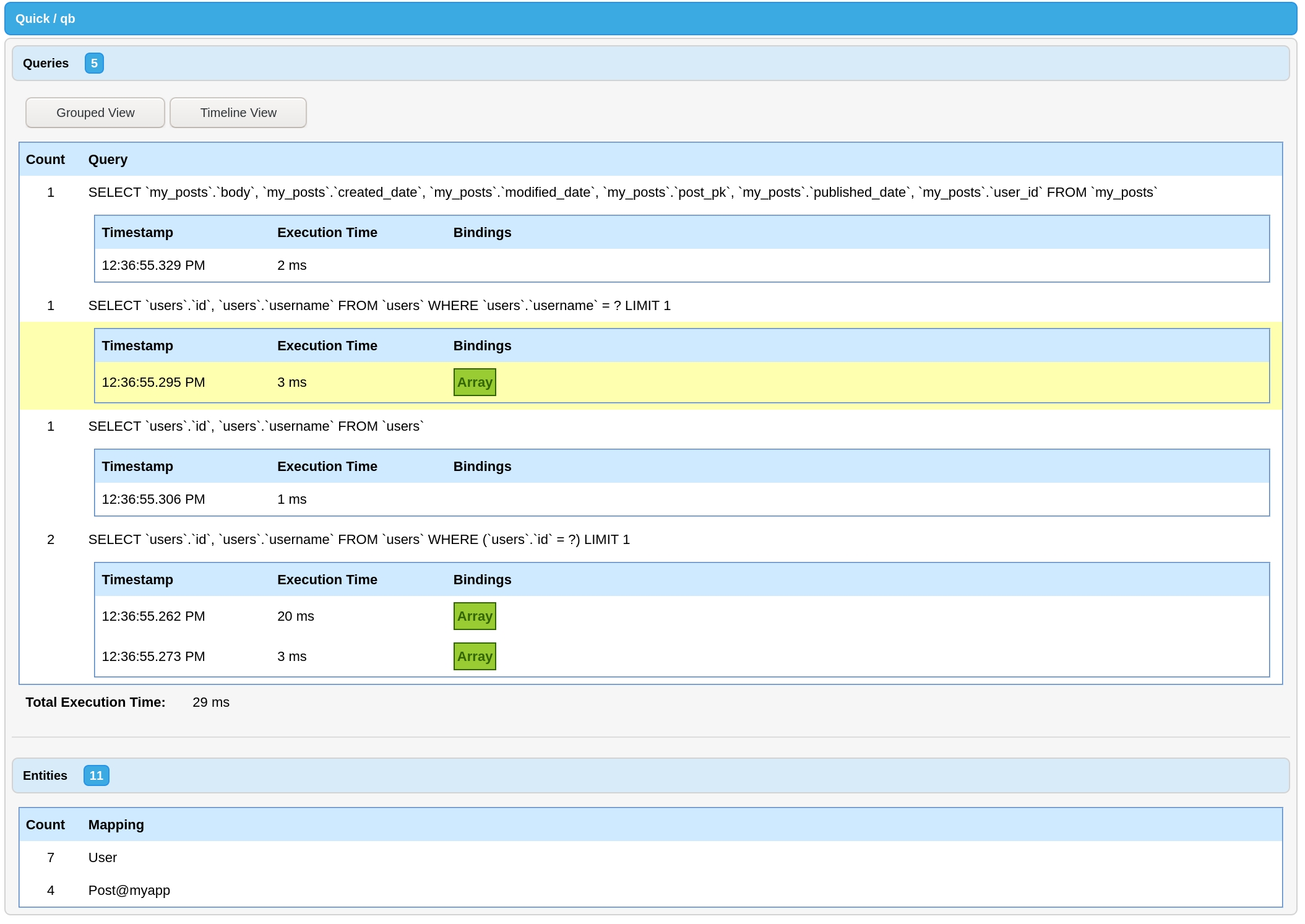
Either a dot-delimited string representing a relationship chain ending with an attribute name, a QueryBuilder object, or a closure that configures a QueryBuilder object can be provided. If a closure is provided it will be passed a query object as its only parameter. The resulting query object will be used to computed the subselect.
name
string
true
The name for the subselect. This will be available as an attribute.
subselect
string OR QueryBuilder OR Function
true
name
string
true
The attribute name to create.
Name
Type
Required
Default
Description
relationships
array
true
An array of relationship function names. The relationships are resolved from left to right. Each relationship will be resolved from the previously resolved relationship, starting with the current entity.
relationMethodName
string
false
Current Method Name
The method name called to retrieve this relationship. Uses a stack backtrace to determine by default.
var subscribedUsers = getInstance( "User" )
.where( "subscribed", true )
.orderBy( "subscribedDate" )
.get();var subscribedUsers = getInstance( "User" )
.where( "subscribed", true )
.get();var subscribedUsers = getInstance( "User" )
.whereNotNull( "subscribedDate" )
.get();component extends="quick.models.BaseEntity" accessors="true" {
function scopeSubscribed( query ) {
return query.where( "subscribed", true );
}
}var subscribedUsers = getInstance( "User" )
.subscribed()
.get();var subscribedUsers = getInstance( "User" )
.subscribed()
.orderBy( "subscribedDate" )
.get();component extends="quick.models.BaseEntity" accessors="true" {
function scopeLongestSubscribers( query ) {
return query.orderBy( "subscribedDate" );
}
function scopeSubscribed( query ) {
return query.where( "subscribed", true );
}
}var subscribedUsers = getInstance( "User" )
.subscribed()
.longestSubscribers()
.get();component extends="quick.models.BaseEntity" accessors="true" {
function scopeOfType( query, type ) {
return query.where( "type", type );
}
}var subscribedUsers = getInstance( "User" )
.ofType( "admin" )
.get();component extends="quick.models.BaseEntity" accessors="true" {
property name="id";
property name="username";
property name="password";
property name="type";
function scopeOfType( query, type = "limited" ) {
return query.where( "type", type );
}
function scopeResetPasswords( query ) {
return query.updateAll( { "password" = "" } ).result.recordcount;
}
}getInstance( "User" ).ofType( "admin" ).resetPasswords(); // 1component extends="User" table="users" accessors="true" {
function applyGlobalScopes( qb ) {
qb.ofType( "admin" );
}
}var admins = getInstance( "Admin" ).all();
// SELECT * FROM users WHERE type = 'admin'
// disable all global scopes
var admins = getInstance( "Admin" ).withoutGlobalScope().all();
// selectively disable global scopes
var admins = getInstance( "Admin" ).withoutGlobalScope( [ "ofType" ] ).all();
// SELECT * FROM userscomponent extends="quick.models.BaseEntity" accessors="true" {
/* properties */
function logins() {
return hasMany( "Login" ).latest();
}
function scopeAddLastLoginDate( qb ) {
qb.addSubselect( "lastLoginDate", newEntity( "Login" )
.select( "timestamp" )
.whereColumn( "users.id", "user_id" )
);
}
}var user = getInstance( "User" ).addLastLoginDate().first();
user.getLastLoginDate(); // {ts 2019-05-02 08:24:51} var user = getInstance( "User" )
.addLastLoginDate()
.where( "lastLoginDate", ">", "2019-05-10" )
.all();function scopeLoggedInAfter( qb, required date afterDate ) {
return qb.where( "lastLoginDate", ">", afterDate );
}component extends="quick.models.BaseEntity" accessors="true" {
/* properties */
function logins() {
return hasMany( "Login" );
}
function scopeAddLastLoginDate( qb ) {
qb.addSubselect( "lastLoginDate", "logins.timestamp" );
}
}var user = getInstance( "User" )
.addSubselect( "lastLoginDate", "logins.timestamp" )
.first();
user.getLastLoginDate(); // {ts 2019-05-02 08:24:51}component extends="quick.models.BaseEntity" accessors="true" {
/* properties */
function scopeWithLatestPost( qb ) {
return qb.addSubselect( "latestPostId", newEntity( "Post" )
.select( "id" )
.whereColumn( "user_id", "users.id" )
.orderBy( "created_date", "desc" )
).with( "latestPost" );
}
function latestPost() {
return belongsTo( "Post", "latestPostId" );
}
}var users = getInstance( "User" ).withLatestPost().all();
for ( var user in users ) {
user.getLatestPost().getTitle(); // My awesome post, etc.
}// Post.cfc
component extends="quick.models.BaseEntity" accessors="true" {
function scopeAddType( qb ) {
qb.selectRaw( "
CASE
WHEN publishedDate IS NULL THEN 'unpublished'
ELSE 'published'
END AS publishedStatus
" );
appendVirtualAttribute( "publishedStatus" );
}
}// User.cfc
component extends="quick.models.BaseEntity" accessors="true" {
function permissions() {
return hasManyThrough( [ "userPermissions", "permission" ] );
}
function userPermissions() {
return hasMany( "UserPermission" );
}
}// Permission.cfc
component extends="quick.models.BaseEntity" accessors="true" {
function users() {
return hasManyThrough( [ "userPermissions", "user" ] );
}
function userPermissions() {
return hasMany( "UserPermission" );
}
}// UserPermission.cfc
component extends="quick.models.BaseEntity" accessors="true" {
function user() {
return belongsTo( "User" );
}
function permission() {
return belongsTo( "Permission" );
}
}hasManyThrough( [ "userPermissions", "permission" ] );
+----------------+---------------------------+----------------+
| Current Entity | Relationship Method Names | Related Entity |
+================+===========================+================+
| User | userPermissions | UserPermission |
+----------------+---------------------------+----------------+
| UserPermission | permission | Permission |
+----------------+---------------------------+----------------+// User.cfc
component extends="quick.models.BaseEntity" accessors="true" {
function team() {
return belongsTo( "Team" );
}
function teammates() {
return hasManyThrough( [ "team", "members" ] );
}
}// Team.cfc
component extends="quick.models.BaseEntity" accessors="true" {
function members() {
return hasMany( "User" );
}
}hasManyThrough( [ "team", "members" ] );
+----------------+---------------------------+----------------+
| Current Entity | Relationship Method Names | Related Entity |
+================+===========================+================+
| User | team | Team |
+----------------+---------------------------+----------------+
| Team | members | User |
+----------------+---------------------------+----------------+// User.cfc
component extends="quick.models.BaseEntity" accessors="true" {
function team() {
return belongsTo( "Team" );
}
function teammates() {
return hasManyThrough( [ "team", "members" ] );
}
function officemates() {
return hasManyThrough( [ "team", "office", "teams", "members" ] );
}
}// Team.cfc
component extends="quick.models.BaseEntity" accessors="true" {
function members() {
return hasMany( "User" );
}
function office() {
return belongsTo( "Office" );
}
}// Office.cfc
component extends="quick.models.BaseEntity" accessors="true" {
function teams() {
return hasMany( "Team" );
}
}hasManyThrough( [ "team", "office", "teams", "members" ] );
+----------------+---------------------------+----------------+
| Current Entity | Relationship Method Names | Related Entity |
+================+===========================+================+
| User | team | Team |
+----------------+---------------------------+----------------+
| Team | office | Office |
+----------------+---------------------------+----------------+
| Office | teams | Team |
+----------------+---------------------------+----------------+
| Team | members | User |
+----------------+---------------------------+----------------+// User.cfc
component extends="quick.models.BaseEntity" accessors="true" {
function team() {
return belongsTo( "Team" );
}
function teammates() {
return hasManyThrough( [ "team", "members" ] );
}
function officemates() {
return hasManyThrough( [ "team", "office", "members" ] );
}
}// Team.cfc
component extends="quick.models.BaseEntity" accessors="true" {
function members() {
return hasMany( "User" );
}
function office() {
return belongsTo( "Office" );
}
}// Office.cfc
component extends="quick.models.BaseEntity" accessors="true" {
function teams() {
return hasMany( "Team" );
}
function members() {
return hasManyThrough( [ "teams", "members" ] );
}
}hasManyThrough( [ "team", "office", "members" ] );
+----------------+---------------------------+----------------+
| Current Entity | Relationship Method Names | Related Entity |
+================+===========================+================+
| User | team | Team |
+----------------+---------------------------+----------------+
| Team | office | Office |
+----------------+---------------------------+----------------+
| Office | members | (below) |
+----------------+---------------------------+----------------+---+
| Office | teams | Team |
+----------------+---------------------------+----------------+
| Team | members | User |
+----------------+---------------------------+----------------+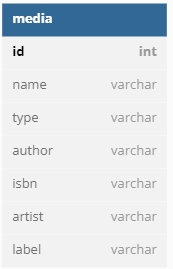
To get started with Quick, you need an entity. You start by extending quick.models.BaseEntity.
That's all that is needed to get started with Quick. There are a few defaults of Quick worth mentioning here.
You can generate Quick entities from CommandBox! Install quick-commands and use quick entity create to get started!
To order by a relationship field, you will use a dot-delimited syntax.
The last item in the dot-delimited string should be an attribute on the related entity.
Nested relationships are also supported. Continue to chain relationships in your dot-delimited string until arriving at the desired entity. Remember to end with the attribute to order by.
If you desire to be explicit, you can use the orderByRelated method, which is what is being called under the hood.
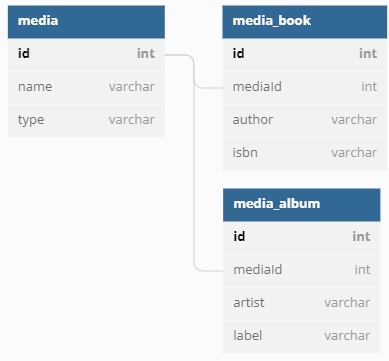
We don't need to tell Quick what table name to use for our entity. By default, Quick uses the pluralized, snake_cased name of the component for the table name. That means for our User entity Quick will assume the table name is users. For an entity with multiple words like PasswordResetToken the default table would be password_reset_tokens. You can override this by specifying a table metadata attribute on the component.
For more information on using inheritance and child tables in your relational database model, see Subclass Entities.
By default, Quick assumes a primary key of id. The name of this key can be configured by setting variables._key in your component.
Quick also assumes a key type that is auto-incrementing. If you would like a different key type, override thekeyType function and return the desired key type from that function.
Quick ships with the following key types:
AutoIncrementingKeyType
NullKeyType
ReturningKeyType
UUIDKeyType
RowIDKeyType
keyType can be any component that adheres to the keyType interface, so feel free to create your own and distribute them via ForgeBox.
Quick also supports compound or composite keys as a primary key. Define your variables._key as an array of the composite keys:
You specify what attributes are retrieved by adding properties to your component.
Now, only the id, username, and email attributes will be retrieved.
Make sure to include the primary key (id by default) as a property.
To prevent Quick from mapping a property to a database column add the persistent="false" attribute to the property. This is needed mostly when using dependency injection.
If the column name in your table is not the column name you wish to use in Quick, you can specify the column name using the column metadata attribute. The attribute will be available using the name of the attribute.
To work around CFML's lack of null, you can use the nullValue and convertToNull attributes.
nullValue defines the value that is considered null for a attribute. By default it is an empty string. ("")
convertToNull is a flag that, when false, will not try to insert null in to the database. By default this flag is true.
The readOnly attribute will prevent setters, updates, and inserts to a attribute when set to true.
In some cases you will need to specify an exact SQL type for your attribute. Any value set for the sqltype attribute will be used when inserting or updating the attribute in the database. It will also be used when you use the attribute in a where constraint.
Attributes can be marked as virtual, meaning that they are not read from or persisted to the database. They can still be interacted with using getters and setters and will appear in an entity's memento.
If you are using generated accessors it is recommended to set getter="false" and setter="false" on the virtual attribute so Quick's internal code can act on the virtual attribute.
Defining an attribute as virtual goes hand in hand with declaring a custom cast. (See below.)
The casts attribute allows you to use a value in your CFML code as a certain type while being a different type in the database. A common example of this is a boolean which is usually represented as a BIT in the database.
Two casters ship with Quick: BooleanCast@quick and JsonCast@quick. You can add them using those mappings to any applicable columns.
The casts attribute must point to a WireBox mapping that resolves to a component that implements the quick.models.Casts.CastsAttribute interface. (The implements keyword is optional.) This component defines how to get a value from the database in to the casted value and how to set a casted value back to the database. Below is an example of the built-in BooleanCast, which comes bundled with Quick.
Casted values are lazily loaded and cached for the lifecycle of the component. Only cast values that have been loaded will have set called on them when persisting to the database.
Casts can be composed of multiple fields as well. Take this Address value object, for example:
This component is not a Quick entity. Instead it represents a combination of fields stored on our User entity:
Noticed that the casted address is neither persistent nor does it have a getter or setter created for it.
The last piece of the puzzle is our AddressCast component that handles casting the value to and from the native database values:
You can see that returning a struct of values from the set function assigns multiple attributes from a single cast.
You can prevent inserting and updating a property by setting the insert or update attribute to false.
Quick handles formula, computed, or subselect properties using query scopes and the addSubselect helper method. Check out the docs in query scopes to learn more.
Quick uses a default datasource and default grammar, as described here. If you are using multiple datasources you can override default datasource by specifying a datasource metadata attribute on the component. If your extra datasource has a different grammar you can override your grammar as well by specifying a grammar attribute.
At the time of writing Valid grammar options are: MySQLGrammar@qb, PostgresGrammar@qb, SqlServerGrammar@qb and OracleGrammar@qb. Please check the qb docs for additional options.
You can compare entities using the isSameAs and isNotSameAs methods. Each method takes another entity and returns true if the two objects represent the same entity.
relationshipName
String | [String]
true
A dot-delimited string of relationship names or an array of relationship names to traverse to get to the related entity to order by.
columnName
string
true
The column name in the final relationship to order by.
direction
string
false
"asc"
The direction to sort, asc or desc.
You might prefer the explicitness of this method, but it cannot handle normal orders like orderBy. Use whichever method you prefer.
Name
Type
Required
Default
Description
// User.cfc
component extends="quick.models.BaseEntity" accessors="true" {}// User.cfc
component table="t_users" extends="quick.models.BaseEntity" accessors="true" {}// User.cfc
component extends="quick.models.BaseEntity" accessors="true" {
variables._key = "user_id";
}// User.cfc
component extends="quick.models.BaseEntity" accessors="true" {
function keyType() {
return variables._wirebox.getInstance( "UUIDKeyType@quick" );
}
}interface displayname="KeyType" {
/**
* Called to handle any tasks before inserting into the database.
* Recieves the entity as the only argument.
*/
public void function preInsert( required entity );
/**
* Called to handle any tasks after inserting into the database.
* Recieves the entity and the queryExecute result as arguments.
*/
public void function postInsert( required entity, required struct result );
}// PlayingField.cfc
component extends="quick.models.BaseEntity" accessors="true" {
property name="fieldID";
property name="clientID";
property name="fieldName";
variables._key = [ "fieldID", "clientID" ];
function keyType() {
return variables._wirebox.getInstance( "NullKeyType@quick" );
}
}// User.cfc
component extends="quick.models.BaseEntity" accessors="true" {
property name="id";
property name="username";
property name="email";
}// User.cfc
component extends="quick.models.BaseEntity" accessors="true" {
property name="bcrypt" inject="@BCrypt" persistent="false";
property name="id";
property name="username";
property name="email";
}component extends="quick.models.BaseEntity" accessors="true" {
property name="id";
property name="username" column="user_name";
property name="countryId" column="FK_country_id";
}component extends="quick.models.BaseEntity" accessors="true" {
property name="id";
property name="number" convertToNull="false";
property name="title" nullValue="REALLY_NULL";
}component extends="quick.models.BaseEntity" accessors="true" {
property name="id";
property name="createdDate" readonly="true";
}component extends="quick.models.BaseEntity" accessors="true" {
property name="id";
property name="number" sqltype="cf_sql_varchar";
}// User.cfc
component extends="quick.models.BaseEntity" accessors="true" {
property name="id";
property name="active" casts="BooleanCast@quick";
}// BooleanCast.cfc
component implements="CastsAttribute" {
/**
* Casts the given value from the database to the target cast type.
*
* @entity The entity with the attribute being casted.
* @key The attribute alias name.
* @value The value of the attribute.
*
* @return The casted attribute.
*/
public any function get(
required any entity,
required string key,
any value
) {
return isNull( arguments.value ) ? false : booleanFormat( arguments.value );
}
/**
* Returns the value to assign to the key before saving to the database.
*
* @entity The entity with the attribute being casted.
* @key The attribute alias name.
* @value The value of the attribute.
*
* @return The value to save to the database. A struct of values
* can be returned if the cast value affects multiple attributes.
*/
public any function set(
required any entity,
required string key,
any value
) {
return arguments.value ? 1 : 0;
}
}// Address.cfc
component accessors="true" {
property name="streetOne";
property name="streetTwo";
property name="city";
property name="state";
property name="zip";
function fullStreet() {
var street = [ getStreetOne(), getStreetTwo() ];
return street.filter( function( part ) {
return !isNull( part ) && part != "";
} ).toList( chr( 10 ) );
}
function formatted() {
return fullStreet() & chr( 10 ) & "#getCity()#, #getState()# #getZip()#";
}
}component extends="quick.models.BaseEntity" accessors="true" {
property name="id";
property name="username";
property name="firstName" column="first_name";
property name="lastName" column="last_name";
property name="password";
property name="address"
casts="AddressCast"
virtual="true"
getter="false"
setter="false";
property name="streetOne";
property name="streetTwo";
property name="city";
property name="state";
property name="zip";
}component implements="quick.models.Casts.CastsAttribute" {
property name="wirebox" inject="wirebox";
/**
* Casts the given value from the database to the target cast type.
*
* @entity The entity with the attribute being casted.
* @key The attribute alias name.
* @value The value of the attribute.
* @attributes The struct of attributes for the entity.
*
* @return The casted attribute.
*/
public any function get(
required any entity,
required string key,
any value
) {
return wirebox.getInstance( dsl = "Address" )
.setStreetOne( entity.retrieveAttribute( "streetOne" ) )
.setStreetTwo( entity.retrieveAttribute( "streetTwo" ) )
.setCity( entity.retrieveAttribute( "city" ) )
.setState( entity.retrieveAttribute( "state" ) )
.setZip( entity.retrieveAttribute( "zip" ) );
}
/**
* Returns the value to assign to the key before saving to the database.
*
* @entity The entity with the attribute being casted.
* @key The attribute alias name.
* @value The value of the attribute.
* @attributes The struct of attributes for the entity.
*
* @return The value to save to the database. A struct of values
* can be returned if the cast value affects multiple attributes.
*/
public any function set(
required any entity,
required string key,
any value
) {
return {
"streetOne": arguments.value.getStreetOne(),
"streetTwo": arguments.value.getStreetTwo(),
"city": arguments.value.getCity(),
"state": arguments.value.getState(),
"zip": arguments.value.getZip()
};
}
}component extends="quick.models.BaseEntity" accessors="true" {
property name="id";
property name="email" column="email" update="false" insert="true";
}// User.cfc
component
datasource="myOtherDatasource"
grammar="PostgresGrammar@qb"
extends="quick.models.BaseEntity"
accessors="true"
{
// ....
}var userOne = getInstance( "User" ).findOrFail( 1 );
var userTwo = getInstance( "User" ).findOrFail( 1 );
userOne.isSameAs( userTwo ); // true
userOne.isNotSameAs( userTwo ); // falsegetInstance( "Post" ).orderBy( "author.name" );getInstance( "Post" ).orderBy( "author.team.name" );getInstance( "Post" ).orderByRelated( "author.team", "name" );
// or
getInstance( "Post" ).orderByRelated( [ "author", "team" ], "name" );relationshipName
String
true
The relationship to check. Can also be a dot-delimited list of nested relationships.
operator
String
false
An optional operator to constrain the check. See qb for a list of valid operators.
count
numeric
false
An optional count to constrain the check.
negate
boolean
false
false
If true, checks for the the absence of the relationship instead of its existence.
Checks for the existence of a relationship when executing the query.
By default, a has constraint will only return entities that have one or more of the related entity.
An optional operator and count can be added to the call.
Nested relationships can be checked by passing a dot-delimited string of relationships.
Name
Type
Required
Default
Description
relationshipName
String
true
The relationship to check. Can also be a dot-delimited list of nested relationships.
operator
String
false
Checks for the absence of a relationship when executing the query.
By default, a doesntHave constraint will only return entities that have zero of the related entity.
An optional operator and count can be added to the call.
Nested relationships can be checked by passing a dot-delimited string of relationships.
Name
Type
Required
Default
Description
relationshipName
String
true
The relationship to check. Can also be a dot-delimited list of nested relationships.
closure
Function
true
When you need to have more control over the relationship constraint, you can use whereHas. This method operates similarly to has but also accepts a callback to configure the relationship constraint.
The whereHas callback is passed a builder instance configured according to the relationship. You may call any entity or query builder methods on it as usual.
When you specify a nested relationship, the builder instance is configured for the last relationship specified.
An optional operator and count can be added to the call, as well.
Name
Type
Required
Default
Description
relationshipName
String
true
The relationship to check. Can also be a dot-delimited list of nested relationships.
closure
Function
true
The whereDoesntHave callback is passed a builder instance configured according to the relationship. You may call any entity or query builder methods on it as usual.
When you specify a nested relationship, the builder instance is configured for the last relationship specified.
An optional operator and count can be added to the call, as well.
Name
Type
Required
Default
Description
getInstance( "User" ).has( "posts" ).get();getInstance( "User" ).has( "posts", ">", 2 ).get();getInstance( "User" ).has( "posts.comments" ).get();getInstance( "User" ).doesntHave( "posts" ).get();getInstance( "User" ).doesntHave( "posts", "<=", 1 ).get();getInstance( "User" ).doesntHave( "posts.comments" ).get();getInstance( "User" )
.whereHas( "posts", function( q ) {
q.where( "body", "like", "%different%" );
} )
.get();getInstance( "User" )
.whereHas( "posts.comments", function( q ) {
q.where( "body", "like", "%great%" );
} )
.get();getInstance( "User" )
.whereHas( "posts.comments", function( q ) {
q.where( "body", "like", "%great%" );
}, ">", 2 )
.get();getInstance( "User" )
.whereDoesntHave( "posts", function( q ) {
q.where( "body", "like", "%different%" );
} )
.get();getInstance( "User" )
.whereDoesntHave( "posts.comments", function( q ) {
q.where( "body", "like", "%great%" );
} )
.get();getInstance( "User" )
.whereDoesntHave( "posts.comments", function( q ) {
q.where( "body", "like", "%great%" );
}, ">", 2 )
.get();An optional operator to constrain the check. See qb for a list of valid operators.
count
numeric
false
An optional count to constrain the check.
A closure to constrain the relationship check.
operator
String
false
An optional operator to constrain the check. See qb for a list of valid operators.
count
numeric
false
An optional count to constrain the check.
negate
boolean
false
false
If true, checks for the the absence of the relationship instead of its existence.
A closure to constrain the relationship check.
operator
String
false
An optional operator to constrain the check. See qb for a list of valid operators.
count
numeric
false
An optional count to constrain the check.
A polymorphicBelongsTo relationship is a many-to-one relationship. This relationship is used when an entity can belong to multiple types of entities. The classic example for this type of relationship is Posts, Videos, and Comments. For instance, a Comment may belong to a Post or a Video.
The only value passed to polymorphicBelongsTo is a prefix for the polymorphic type. A common convention where is to add able to the end of the entity name, though this is not automatically done. In our example, this prefix is commentable. This tells quick to look for a commentable_type and a commentable_id column in our Comment entity. It stores our entity's mapping as the _type and our entity's primary key value as the _id.
When retrieving a polymorphicBelongsTo relationship the _id is used to retrieve a _type from the database.
The inverse of polymorphicBelongsTo is also polymorphicHasMany. It is important to choose the right relationship for your database structure. hasOne assumes that the related model has the foreign key for the relationship.
Returns a polymorphicBelongsTo relationship between this entity and the entity defined by relationName.
id
String
false
name & "_id"
The column name that defines the id of the polymorphic relationship.
localKey
String | [String]
false
related.keyNames()
The column name on the realted entity that is referred to by the foreignKey of the parent entity.
relationMethodName
String
false
The method name called on the entity to produce this relationship.
The method name called to retrieve this relationship. Uses a stack backtrace to determine by default.
DO NOT PASS A VALUE HERE UNLESS YOU KNOW WHAT YOU ARE DOING.
Name
Type
Required
Default
Description
name
String
false
relationMethodName
The name given to the polymorphic relationship.
type
String
false
name & "_type"
The column name that defines the type of the polymorphic relationship.
// Comment.cfc
component extends="quick.models.BaseEntity" accessors="true" {
function post() {
return polymorphicBelongsTo( "commentable" );
}
}// Post.cfc
component extends="quick.models.BaseEntity" accessors="true" {
function comments() {
return polymorphicHasMany( "Comment", "commentable" );
}
}// Video.cfc
component extends="quick.models.BaseEntity" accessors="true" {
function comments() {
return polymorphicHasMany( "Comment", "commentable" );
}
}Better matching of only "as" in relationship strings.
Upgrade to qb v10
Child Entities: Ensure single table inheritance columns are not duplicated.
HasOneThrough: Added the missing matchOnemethod.
Child Entities: Fixed qualifying columns on discriminated joined entities.
Fixed an issue with NULLvalues being inserted into identify columns for SQL Server
When a relationship, if there is a defined, it will return the default entity instead of null.
The function no longer accepts a ignoreNonExistentAttributes flag. This is because assignAttributesData always skips non-existent attributes.
Get a new filled instance of a relationship by calling the fill method on the relationship object.
Add newAttributes and originalAttributes to the event.
Add methods to Relationship classes.
Clear the relationship cache for a relationship when using the relationship setter.
Only compute the attributes hash from persistent attributes.
Handle null values when assigning to attributes
Fixed an issue where virtual attributes were not being applied to discriminated child entities when loading through the parent.
Respect qb's support options.
Handle skipping constraints when a relationship is defined with other relationships
Make the withoutRelationshipConstraints check more resilient by checking against a set of relationship method names.
The withoutRelationshipConstraints method now requires the relationship method name as the first parameter.
This is used to ensure only the desired relationship has its constraints skipped. This is especially important in asynchronous contexts.
Fix for thread safety when loading multiple relationships off of a single entity
Fix qualifying column issue when using HasManyDeep relationships.
Remove duplicate join from addCompareConstraints when using HasManyDeep relationships.
Upgrade to latest str dependency
Introduced a new alternative relationship to the old hasManyThrough — hasManyDeep. It produces more readable, parsable SQL and is the basis for the new version of hasManyThrough.
If you prefer the hasManyDeep syntax over the hasManyThrough syntax, you might enjoy the HasManyDeepBuilder, a builder object to create the hasManyDeep relationship. It is generally more readable, especially when using additional constraints on related or through entities, at the cost of verbosity.
All hasManyThrough relationships are now hasManyDeep relationships under the hood. No code changes should be necessary for you to enjoy more readable SQL, less bugs, and greater performance. 🏎️
Use the interceptor approach instead of wirebox:targetId to support CommandBox 5.
Fix where discriminated entities could use the wrong qualified column name in the join with the parent entity.
Return optional QuickBuilder instances for withCount and withSum to allow for further chaining.
Fix clearAttribute when not setting to null.
Fix using a QueryBuilder instance to define a subselect.
Add test case for checking null attributes on newly created entities.
Add test case for deleteAll off of a hasMany relationship.
Add test case for belongsToMany withCount.
Allow setting for the underlying qb instance backing Quick.
Pin to version 3.
Add a method, similar to for quickly adding a subselect based on the sum of a relationship's attribute.
Correctly handle null values with casted attributes.
QuickBuilder now has its own clone method that behaves as you would expect. Previously, it only cloned the enclosed QueryBuilder which was not that useful.
Making this fix required the newQuery method of QuickBuilder to return an instance of QuickBuilder instead of QueryBuilder as it previously was. If you need a new QueryBuilder instance from a QuickBuilder, use the newQuickQB method.
Allow a QuickBuilder to be used wherever a QueryBuilder can be used.
Add the ability to .
asQuery methodThis method is similar to asMemento. You use it when the return format you want is an array of structs. asQuery will skip creating entities at all, instead returning the values straight from qb. This can result in a large performance boost depending on the number of records being returned. Additionally, asQuery supports returning the columns using the alias names and returning eager loaded entities.
Read more in the docs.
Add compatibility with ColdBox 7.
Fixed a bug where once a virtual attribute was added to an entity it was added to all future entities of that same type.
Dropped support for ColdBox 5.
Use correct nesting for where statements
Fixed retrieving null values from fields and relationships
Special handling for Lucee generated keys
Workaround for adobe@2021 not supporting null values in param statements
Upgrade to latest cfmigrations (v4.0.0)
Add a way to not fire events inside a callback using withoutFiringEvents.
Upgrade to qb 9
HasOneOrManyThrough: Fix too many joins for has and whereHas
HasOneOrManyThrough: Fixed applying of through constraints BaseEntity: Use wirebox to get the util to work in CommandBox
Fix bad link to Getting Started guide
Use existing builder when adding subselects
Update to latest mementifier (v3.0.0)
CommandBox compatibility
Force generated key to be an integer.
CommandBox-friendly injections using the box namespace.
Fixed regression where eager loading inside a relationship was broken.
Fixed accessing QuickBuilder from entities and relationships.
Add include and exclude arguments to method.
Always return numeric value for .
Add the builder to the preInsert method for .
Set the table when creating new queries.
Added support for with discriminated subclass entities.
In 5.0.0, we stepped up the performance of Quick in a major way. Entity creation is now over twice as fast as before.
Average duration to create one entity:
While the times may seem small, this is compounded for each entity you create. So, if you are retrieving 1000 entities, multiply each of these numbers by 1000 and you'll start to see why this matters.
This did introduce one breaking change from v4. See the for more information.
Added a new that will correctly set your primary key if your database only returns ROWID in the queryExecute response.
Fixed a null check in isNullValue.
Fixed nulls coming back as strings in JsonCast.
Add a pagination method for quicker performance when total records or total pages are not needed or too slow.
Configure columns are no longer cleared when setting up a BelongsToMany relationship.
Provide initialThroughConstraints for hasOne relationships (used in *Through relationships).
Ignore orders when retrieving a relationship count.
Preserve casted value after saving an entity.
Allow for including
Look up returning values by column name not by alias in the ReturningKeyType.
Skip eager loading database call when no keys are found.
Only apply CONCAT when needed in *Through relationships.
Use WHERE EXISTS over DISTINCT when fetching relationships. DISTINCT restricts some of the queries that can be run.
📹
, , and callbacks now automatically group where clauses when an OR combinator is detected.
Dynamically add to a parent entity without loading all of the relationship.
Give a helpful error message when trying to set relationship values before saving an entity, where applicable.
Multiple bug fixes related to and when using belongsToThrough, hasOneThrough, or hasManyThrough
Correct jQuery link in test runner.
Allow expressions in basic where clauses.
Fix delete naming collision.
Add an alias to with to QuickBuilder.
Fix a stack overflow on nested relationship checks.
Configured tables (.from) are now used for qualifying columns.
Remove unnecessary nesting in compare queries.
Fix when using "OR" combinators.
Add support for JSON using a new JsonCast@quick component.
Compatibility updates for ColdBox 6
Optimize caching
Apply during .
Account for null values in .
Swap structAppend order for a Lucee bug in mementifier integration.
Please see the for more information on these changes.
Drop support for Lucee 4.5 and Adobe ColdFusion 11.
Virtual Inheritance (using a quick annotation instead of extending quick.models.BaseEntity) has been removed. It was hardly used, and removing it allows us to simplify some of the code paths.
accessors="true" is now required on every entity. This is similar to above where requiring it allows us to simplify the codebase immensely. A helpful error message will be thrown if
for memento transformations.
Use to automatically convert queries to mementos.
Automatically-generated .
Add error message for defaulting key values.
Define per entity.
Apply custom setters when hydrating from the database. (Reverted in 2.5.3 for unintended consequences with things like password hashing.)
This allows you to use scopes to perform query functions and return values. (If you do not want to return a custom value, return the QueryBuilder instance or nothing.)
Improve error messages for not loaded entities.
(first and find methods)
Mapping foreign keys for relationships is now optional
A hasOneThrough relationship is either a many-to-one or a one-to-one relationship. It is used when you want to access a related entity through one or more intermediate entities. For instance, a Team may have one latest Post through a User.
The only value needed for hasOneThrough is an array of relationship function names to walk through to get to the related entity. The first relationship function name in the array must exist on the current entity. Each subsequent function name must exist on the related entity of the previous relationship result. For our previous example, members must be a relationship function on Team. posts must then be a relationship function on the related entity resulting from calling Team.members(). This returns a hasMany relationship where the related entity is User. So, User must have a posts relationship function. That is the end of the relationship function names array, so the related entity resulting from calling User.posts() is our final entity which is Post
This approach can scale to as many related entities as you need. For instance, let's expand the previous example to include an Office that houses many Teams.
HasOneThrough relationships can be configured to return a default entity if no entity is found. This is done by calling withDefault on the relationship object.
Called this way will return a new unloaded entity with no data. You can also specify any default attributes data by passing in a struct of data to withDefault.
New Quick entities can be created and persisted to the database by creating a new entity instance, setting the attributes on the entity, and then calling the save method.
When we call save, the record is persisted from the database and the primary key is set to the auto-generated value (if any).
We can shortcut the setters above using a fill method.
Allow specifying virtual attributes with a cast.
Allow returning a new non-persisted entity from a relationship using the newEntity function.
Add test case for firstOrNew with aliases and columns.
accessors="true"The defaultGrammar mapping needs to be the full WireBox mapping, including the @qb, if needed.
For instance, MSSQLGrammar would become MSSQLGrammar@qb.
This will allow for other grammars to be more easily contributed via third party modules.
HasManyThrough relationships now only accept a relationships parameter of relationship methods to walk to get to the intended entity.
Attributes using casts="boolean" need to be updated to casts="BooleanCast@quick".
Some method and parameter names have been changed to support composite keys. The majority of changes will only affect you if you have extended base Quick components. The full list can be found in the Upgrade Guide.
Update to qb 7.0.0.
Add a HasOneThrough relationship.
Custom Casts - using custom components to represent one or more attributes.
Add a new QuickBuilder to better handle interop with qb.
Ensure loadRelationship doesn't reload existing relationships.
Add multiple retrieve or new/create methods - firstWhere, firstOrNew, firstOrCreate, findOrNew, and findOrCreate.
Add paginate to Quick.
Add is and isNot to compare entities.
Allow hydrating entities from serialized data.
Allow returning default entities for null relations on HasOne, BelongsTo, HasOneThrough, and BelongsToThrough relationships.
Query relations using has, doesntHave, whereHas, and whereDoesntHave.
Split reset into reset and resetToNew methods.
Store the original attributes for later resetting.
Use parameterLimits to eager load.
Use a new entity each time on BaseService.
Apply sql types for columns to wheres.
Apply global scopes more consistently
Correctly ignore key column when updating.
Fix hasRelationship method to only return true for exact matches.
Better handling of constrained relationships when eager loading.
Convert aliases when qualifying columns.
Add a better error message if onMissingMethod fails.
Only retrieve columns for defined attributes.
Cache entity metadata in CacheBox.
Use attribute hash for checking isDirty.
Return the correct memento with accessors on.
Relationships can also be saved by calling "set" & relationshipName
Virtual Inheritance works on ColdBox 5.2+
adobe@2018
7.65 ms
3.71 ms
adobe@2021
6.68 ms
2.10 ms
lucee@5
3.94 ms
0.88 ms
Name
Type
Required
Default
Description
relationships
array
true
An array of relationship function names. The relationships are resolved from left to right. Each relationship will be resolved from the previously resolved relationship, starting with the current entity.
relationMethodName
string
false
Current Method Name
The method name called to retrieve this relationship. Uses a stack backtrace to determine by default.
// Team.cfc
component extends="quick.models.BaseEntity" accessors="true" {
function latestPost() {
return hasOneThrough( [ "members", "posts" ] )
.orderByDesc( "publishedDate" );
}
function members() {
return hasMany( "User" );
}
}// User.cfc
component extends="quick.models.BaseEntity" accessors="true" {
function posts() {
return hasMany( "Post" );
}
function team() {
return belongsTo( "Team" );
}
}// Post.cfc
component extends="quick.models.BaseEntity" accessors="true" {
function author() {
return belongsTo( "Post" );
}
}hasOneThrough( [ "members", "posts" ] );
+----------------+---------------------------+----------------+
| Current Entity | Relationship Method Names | Related Entity |
+================+===========================+================+
| Team | members | User |
+----------------+---------------------------+----------------+
| User | posts | Post |
+----------------+---------------------------+----------------+// Office.cfc
component extends="quick.models.BaseEntity" accessors="true" {
function latestPost() {
return hasOneThrough( [ "teams", "members", "posts" ] )
.orderByDesc( "publishedDate" );
}
function teams() {
return hasMany( "Team" );
}
}// Team.cfc
component extends="quick.models.BaseEntity" accessors="true" {
function members() {
return hasMany( "User" );
}
function office() {
return belongsTo( "Office" );
}
}// User.cfc
component extends="quick.models.BaseEntity" accessors="true" {
function team() {
return belongsTo( "Team" );
}
function posts() {
return hasMany( "Post" );
}
}// Post.cfc
component extends="quick.models.BaseEntity" accessors="true" {
function author() {
return belongsTo( "User" );
}
}hasOneThrough( [ "teams", "members", "posts" ] )
+----------------+---------------------------+----------------+
| Current Entity | Relationship Method Names | Related Entity |
+================+===========================+================+
| Office | teams | Team |
+----------------+---------------------------+----------------+
| Team | members | User |
+----------------+---------------------------+----------------+
| User | posts | Post |
+----------------+---------------------------+----------------+// Team.cfc
component extends="quick.models.BaseEntity" accessors="true" {
function latestPost() {
return hasOneThrough( [ "members", "posts" ] )
.orderByDesc( "publishedDate" )
.withDefault();
}
function members() {
return hasMany( "User" );
}
}// Team.cfc
component extends="quick.models.BaseEntity" accessors="true" {
function latestPost() {
return hasOneThrough( [ "members", "posts" ] )
.orderByDesc( "publishedDate" )
.withDefault( {
"title": "Your next great post!"
} );
}
function members() {
return hasMany( "User" );
}
}Finds the first matching record or creates a new entity.
Name
Type
Required
Default
Description
attributes
struct
false
{}
A struct of key / value pairs to fill in to the new entity.
ignoreNonExistentAttributes
boolean
false
false
Sets attributes data from a struct of key / value pairs. This method does the following, in order:
Guard against read-only attributes.
Attempt to call a relationship setter.
Calls custom attribute setters for attributes that exist.
Throws an error if an attribute does not exist (if ignoreNonExistentAttributes is false which is the default).
Name
Type
Required
Default
Description
attributes
struct
false
{}
A struct of key / value pairs to fill in to the new entity.
ignoreNonExistentAttributes
boolean
false
false
Populate is simply an alias for fill. Use whichever one suits you best.
Name
Type
Required
Default
Description
attributes
struct
false
{}
A struct of key / value pairs to fill in to the new entity.
ignoreNonExistentAttributes
boolean
false
false
Creates a new entity with the given attributes and then saves the entity.
There is no need to call save when using the create method.
Name
Type
Required
Default
Description
attributes
struct
false
{}
A struct of attributes to restrict the query. If no entity is found the attributes are filled on the new entity returned.
newAttributes
struct
false
{}
Finds the first matching record or returns an unloaded new entity.
Name
Type
Required
Default
Description
attributes
struct
false
{}
A struct of attributes to restrict the query. If no entity is found the attributes are filled on the new entity created.
newAttributes
struct
false
{}
Finds the first matching record or creates a new entity.
Name
Type
Required
Default
Description
id
any
true
The id value to find.
attributes
struct
false
{}
Returns the entity with the id value as the primary key. If no record is found, it returns a new unloaded entity.
Name
Type
Required
Default
Description
id
any
true
The id value to find.
attributes
struct
false
{}
Returns the entity with the id value as the primary key. If no record is found, it returns a newly created entity.
Name
Type
Required
Default
Description
attributes
struct
false
{}
A struct of attributes to restrict the query. If no entity is found the attributes are filled on the new entity created.
newAttributes
struct
false
{}
Updates an existing record or creates a new record with the given attributes.
Hydration is a term to describe filling an entity with a struct of data and then marking it as loaded, without doing any database queries. For example, this might be useful when hydrating a user from session data instead of doing a query every request.
Name
Type
Required
Default
Description
attributes
struct
false
{}
A struct of key / value pairs to fill in to the entity.
ignoreNonExistentAttributes
boolean
false
false
Hyrdates an entity from a struct of data. Hydrating an entity fills the entity and then marks it as loaded.
If the entity's keys are not included in the struct of data, a MissingHydrationKey is thrown.
Name
Type
Required
Default
Description
mementos
array
false
[]
An array of structs to hydrate into entities.
ignoreNonExistentAttributes
boolean
false
false
Hydrates a new collection of entities from an array of structs.
var user = getInstance( "User" );
user.setUsername( "JaneDoe" );
user.setEmail( "[email protected]" );
user.setPassword( "mypass1234" );
user.save();var user = getInstance( "User" );
user.fill( {
"username": "JaneDoe",
"email": "[email protected]",
"password": "mypass1234"
} );
user.save();var user = getInstance( "User" ).create( {
"username": "JaneDoe",
"email": "[email protected]",
"password": "mypass1234"
} );var user = getInstance( "User" )
.firstOrNew( { "username": rc.username } );var user = getInstance( "User" )
.firstOrCreate( { "username": rc.username } );var user = getInstance( "User" ).findOrNew(
9999,
{
"firstName" : "doesnt",
"lastName" : "exist"
}
);var user = getInstance( "User" ).findOrCreate(
9999,
{
"username" : "doesntexist",
"firstName" : "doesnt",
"lastName" : "exist",
"password" : "secret"
}
);var user = getInstance( "User" ).updateOrCreate( {
"username": "newuser"
} );var user = getInstance( "User" ).hydrate( {
"id": 4,
"username": "JaneDoe",
"email": "[email protected]",
"password": "mypass1234"
} );
user.isLoaded(); // truevar users = getInstance( "User" ).hydrateAll( [
{
"id": 3,
"username": "JohnDoe",
"email": "[email protected]",
"password": "mypass4321"
},
{
"id": 4,
"username": "JaneDoe",
"email": "[email protected]",
"password": "mypass1234"
}
] );If true, does not throw an exception if an attribute does not exist. Instead, it skips the non-existent attribute.
include
list or array
false
[]
List or array of keys to include when filling. All others will be ignored.
exclude
list or array
false
[]
List or array of keys to exclude when filling. All others will be filled.
If true, does not throw an exception if an attribute does not exist. Instead, it skips the non-existent attribute.
If true, does not throw an exception if an attribute does not exist. Instead, it skips the non-existent attribute.
A struct of attributes to fill on the new entity if no entity is found. These attributes are combined with attributes.
ignoreNonExistentAttributes
boolean
false
false
If true, does not throw an exception if an attribute does not exist. Instead, it skips the non-existent attribute.
A struct of attributes to fill on the created entity if no entity is found. These attributes are combined with attributes.
ignoreNonExistentAttributes
boolean
false
false
If true, does not throw an exception if an attribute does not exist. Instead, it skips the non-existent attribute.
A struct of attributes to fill on the new entity if no entity is found.
ignoreNonExistentAttributes
boolean
false
false
If true, does not throw an exception if an attribute does not exist. Instead, it skips the non-existent attribute.
A struct of attributes to use when creating the new entity if no entity is found.
ignoreNonExistentAttributes
boolean
false
false
If true, does not throw an exception if an attribute does not exist. Instead, it skips the non-existent attribute.
A struct of attributes to update on the found entity or the new entity if no entity is found.
ignoreNonExistentAttributes
boolean
false
false
If true, does not throw an exception if an attribute does not exist. Instead, it skips the non-existent attribute.
If true, does not throw an exception if an attribute does not exist. Instead, it skips the non-existent attribute.
If true, does not throw an exception if an attribute does not exist. Instead, it skips the non-existent attribute.
qb v10 is now the minimum version required to use Quick.
Relationships with a default entity but no match used to return null (or an empty struct when in asQuery mode). It will now return the default entity attributes or memento. (Relationships without default entities have no change.)
hydrate no longer accepts a ignoreNonExistentAttributes flag. This is because assignAttributesData always skips non-existent attributes.
withoutRelationshipConstraints method now requires the relationship method name as the first parameter.This is used to ensure only the desired relationship has its constraints skipped. This is especially important in asynchronous contexts.
Calling newQuery on a QuickBuilder now returns a new QuickBuilder instance instead of a new QueryBuilder instance. If you needed a QueryBuilder instance, use the newQuickQB method instead.
It's very likely that Quick v6 will still work on ColdBox 5, but it is no longer an officially supported platform.
This is only a breaking change if you have built your own key types. This is being released as a bug fix since the ReturningKeyType has not worked correctly since 5.0.0
Please upgrade to a supported engine.
This means for scopes, you must call addSubselect off of the passed in builder object.
Instead of this:
the scopes should be called on the passed in Builder instance:
This isn't a breaking change that will affect most people. In fact, it will most likely improve your code.
Previously, when using , , or , you were fully responsible for the wrapping of your where statements. For example, the following query:
with the following scopes defined:
would generate the following SQL:
The problem with this statement is that the OR can short circuit the active check.
The fix is to wrap the LIKE statements in parenthesis. This is done in qb using a function callback to where. Adding this nesting inside our scope will fix this problem.
But this was easy to miss this. This is because you are in a completely different file than the built query. It also breaks the mental model of a scope as an encapsulated piece of SQL code.
In Quick 4.0.0, scopes, whereHas, and whereDoesntHave will automatically group added where clauses when needed. That means our original example now produces the SQL we probably expected.
Grouping is not needed if there is no OR combinator. In these cases no grouping is added.
If you had already wrapped your expression in a group inside the scope, whereHas, or whereDoesntHave call, nothing changes. Your code works as before. The OR combinator check only works on the top most level of added where clauses. Additionally, if you do not add any where clauses inside your scope, nothing changes.
The breaking change part is if you were relying on these statements residing at the same level without grouping. If so, you will need to group your changes into a single scope where you control the grouping or do the querying at the builder level outside of scopes.
Please migrate to a supported engine.
Virtual Inheritance allowed you to use a quick annotation on your entity instead of extending quick.models.BaseEntity. This was hardly used and didn't offer any benefit to extending using traditional inheritance. Additionally, removing the support allows us to clean up the code base by removing duplicate code paths.
If any of your entities are using the quick annotation, instead have them extends="quick.models.BaseEntity".
From the early days of Quick, developers have wanted to have accessors="true" on their entities. Because of this, Quick supported defining entities both with and without accessors. However, just as with virtual inheritance, it created two code paths that could hide bugs and make it hard to follow the code. In Quick 3.0.0, accessors="true" is required on all entities. If it is omitted, a helpful error message is thrown to remind you. This will help immensely in simplifying the code base. (In fact, just introducing this requirement helped find two bugs that were only present when using accessors.)
Ensure all entities have accessors="true" in their component metadata.
Use NullKeyType instead.
Previously, the only valid cast type was casts="boolean". In introducing the new Casts system, the boolean cast was refactored to use the same system. For this reason, any casts="boolean" needs to be changed to casts="BooleanCast@quick"
In previous versions, the value passed to defaultGrammar was used to look up a mapping in the @qb namespace. This made it difficult to add or use grammars that weren't part of qb. (You could get around this be registering your custom grammar in the @qb namespace, but doing so seemed strange.)
To migrate this code, change your defaultGrammar to be the full WireBox mapping in your moduleSettings:
It no longer accepts any entities or columns. Rather, it accepts an array of relationships to walk "through" to end up at the desired entity.
Here's how the old syntax would be used to define the relationship between Country and Post.
This same relationship now needs to be defined in terms of other relationships, like so.
This approach does require a relationship defined for each level, but it works up and down any number of relationships to get to your desired entity.
To update the foreign key of a belongsTo relationship you use the associate method. In the past, it was possible to associate a new, unsaved child entity to its parent using this method.
In an attempt to provide more helpful error messages, this behavior is no longer possible. You can achieve the same effect in one of two ways.
The first is to manually assign the foreign keys:
While this works, it breaks the encapsulation provided by the relationship.
The second approach is to use the hasOne or hasMany side of the relationship to create the new child entity:
If you have all the data handy in a struct, you can use the create method for a more concise syntax.
This is the recommended way of creating these components.
This brings the API in line with the other methods referencing attributes.
Compound key support required some method and parameter name changes. Although the list seems extensive, you will likely not need to change anything in your code unless you have extended built-in Quick components. (You will see many relationship parameter name changes. Note that the function you call to define a relationship is a function on the BaseEntity and has not changed its signature.)
BaseEntity.cfc:
retrieveQualifiedKeyName : String -> retrieveQualifiedKeyNames : [String]
keyName : String -> keyNames : [String]
keyColumn : String
AutoIncrementingKeyType.cfc
This cannot be used with composite primary keys
BaseRelationship.cfc
getKeys now takes an array of keys as the second argument
getQualifiedLocalKey : String -> getQualifiedLocalKeys : [String]
getExistenceCompareKey : String
BelongsTo.cfc
init arguments have changed
foreignKey : String -> foreignKeys : [String]
localKey : String
BelongsToMany.cfc
init arguments have changed
foreignPivotKey : String -> foreignPivotKeys : [String]
relatedPivotKey : String
HasManyThrough.cfc
This component now extends quick.models.Relationships.HasOneOrManyThrough
init arguments are now as follows:
related: The related entity instance.
HasOneOrMany.cfc
init arguments have changed
foreignKey : String -> foreignKeys : [String]
localKey : String
PolymorphicBelongsTo.cfc
init arguments have changed
foreignKey : String -> foreignKeys : [String]
localKey : String
PolymorphicHasOneOrMany.cfc
init arguments have changed
id : String -> ids : [String]
localKey : String
Quick 2.0 brings with it a lot of changes to make things more flexible and more performant. This shouldn't take too long — maybe 2-5 minutes per entity.
There were some common name clashes between internal Quick properties and custom attributes of your entities (the most common being fullName). All Quick internals have been obfuscated to avoid this situation. If you relied on these properties, please consult the following table below for the new property names.
If you are renaming your primary keys in your entities, you will have to change your key definition from variables.key = "user_id"; to variables._key = "user_id"; See for details.
Additionally, some method names have also changed to avoid clashing with automatically generated getters and setters. Please consult the table below for method changes.
Lastly, the following properties and methods have been removed:
Key Types are the way to define setting and retrieving a primary key in Quick. In Quick 1.0 these were injected in to the component. This made reusability hard for simple things like sequence names. In order to allow for more flexible key types, key types are no longer injected. Instead, they should be returned from a keyType method.
The keyType is lazily created and cached on the component, so this is both a more flexible approach as well as being more performant. If you are injecting custom key types in your entities you will need to move them to the method syntax.
A few key types have been renamed and will need to be updated in your codebase:
In additional to the changes to defining key types, there is a few new key types introduced in Quick 2.0.
ReturningKeyType
Used with grammars that return their primary key in the query response when inserting to the database. An example of this is NEWSEQUENTIALID in Microsoft SQL Server.
The way arguments are passed to scopes have been updated to allow for default arguments. query is still the first argument. Other arguments will be passed in order after that. The args struct is no longer passed.
The relationship methods are still named the same but some of the arguments have been changed to fix bugs and support better eager loading performance. Please for more details.
Additionally, the alternative syntax for defining relationships on a relationships struct has been removed. It created an unnecessary code path that had it's own share of bugs. All relationships should be defined as methods on the entity.
CFCollection was included in Quick 1.0 as both a way to lazily eager load a relationship and as a compatibility layer for older CF versions. The compatibility that CFCollection provides, however, comes with a performance cost. Additionally, the majority of users wanted to use plain arrays as the return format. For those reasons, arrays are now the default return format for collections. CFCollections can still be used by specifying a different return format in the module settings.
Null is a tricky thing in CFML. The same goes for interacting with nulls in a database. By default, we will support the CFML convention of using an empty string to represent null. When interacting with the database empty strings will be converted to nulls. You can adjust this behavior on the property level with two new annotations:
convertToNull - Determines if the property will be automatically checked to convert to null at all. Defaults to true.
nullValue - This is the value that is equivalent to null for this property. Defaults to an empty string.
In an effort to avoid dealing with CFML's version of null, Quick originally returned unloaded entities. You could check if an entity was loaded using the isLoaded method. This doesn't make as much sense as null however and even made it more difficult to interact with other libraries. Now Quick will return null when it encounters an empty query result either from a retrieval or from a belongsTo or hasOne relationship. Any instances that you were checking isLoaded should be updated. isLoaded will continue to exist for when you are creating a new entity not from the database.
The default grammar for Quick is now AutoDiscover. This provides a better first run experience. The grammar can still be set in the moduleSettings.
As a new way to interact with Quick, you can use Quick Services to interact with your entities in a service-oriented fashion. These are equivalent to VirtualEntityServices in cborm.
The easiest way to use a Quick Service is to use the quickService: injection dsl.
All methods available on the Quick entity are available on the service.
Eager loading is now supported for nested relationships using a dot-separated syntax. Additionally, constraints can be added to an eager loaded relationship. See the for more information.
Column aliases can now be used in queries. They will be transformed to columns before executing the query.
If you pass a Quick entity to a setter method the entity's keyValue value will be passed.
Columns can be prevented from being inserted or updated using property attributes — insert="false" and update="false".
Quick no longer automatically validates entities before saving them. Having cbvalidation baked in made it hard to extend it. If desired, validation can be added back in using Quick's lifecycle hooks.
instanceReady Lifecycle MethodQuick now announces an instanceReady event after the entity has gone through dependency injected and had its metadata inspected. This can be used to hook in other libraries, like cbvalidation and mementifier.
You can automatically cast a property to a boolean value while retrieving it from the database and back to a bit value when serializing to the database by setting casts="boolean" on the property.
keyColumns : [String]keyValue : String -> keyValues : [String]
getExistenceCompareKeys : [String]localKeys : [String]getQualifiedLocalKey : String -> getQualifiedLocalKeys : [String]
getExistenceCompareKey : String -> getExistenceCompareKeys : [String]
relatedPivotKeys : [String]parentKey : String -> parentKeys : [String]
relatedKey : String -> relatedKeys : [String]
getQualifiedRelatedPivotKeyName : String -> getQualifiedRelatedPivotKeyNames : [String]
getQualifiedForeignPivotKeyName : String -> getQualifiedForeignPivotKeyNames : [String]
getQualifiedForeignKeyName : String -> getQualifiedForeignKeyNames : [String]`
relationName: The WireBox mapping for the related entity.
relationMethodName: The method name called to retrieve this relationship.
parent: The parent entity instance for the relationship.
relationships: An array of relationships between the parent entity and the related entity.
relationshipsMap: A dictionary of relationship name to relationship component.
The following methods no longer exist:
getQualifiedFarKeyName
getQualifiedForeignKeyName
getQualifiedFirstKeyName
getQualifiedParentKeyName
localKeys : [String]getParentKey : any -> getParentKeys : [any]
getQualifiedLocalKey : String -> getQualifiedLocalKeys : [String]
getQualifiedForeignKeyName : String -> getQualifiedForeignKeyNames : [String]
localKeys : [String]localKeys : [String]interceptorService
_interceptorService
keyType
_keyType
entityName
_entityName
mapping
_mapping
fullName
_fullName
table
_table
queryOptions
_queryOptions
readonly
_readonly
key
_key
attributes
_attributes
meta
_meta
nullValues
_nullValues
data
_data
originalAttributes
_originalAttributes
relationshipsData
_relationshipsData
eagerLoad
_eagerLoad
loaded
_loaded
getColumnForAlias
retrieveColumnForAlias
getAliasForColumn
retrieveAliasForColumn
setOriginalAttributes
assignOriginalAttributes
getLoaded
isLoaded
getAttribute
retrieveAttribute
setAttribute
assignAttribute
getQuery
retrieveQuery
getRelationship
retrieveRelationship
setRelationship
assignRelationship
builder
_builder
wirebox
_wirebox
str
_str
settings
_settings
validationManager
_validationManager
setDefaultProperties
assignDefaultProperties
getKeyValue
keyValue
getAttributesData
retrieveAttributesData
getAttributeNames
retrieveAttributeNames
setAttributesData
assignAttributesData
relationships
AssignedKey
NullKeyType
AutoIncrementing
AutoIncrementingKeyType
UUID
UUIDKeyType
/**
* Called to handle any tasks before inserting into the database.
* Receives the entity as the only argument.
*
* @entity The entity that is being inserted.
* @builder The builder that is doing the inserting.
*
* @return void
*/
public void function preInsert( required any entity, required any builder );function scopeAddAuthorName( qb ) {
qb.addSubselect( "authorName", "author.name" );
}function applyGlobalScopes() {
this.addVendorName();
this.addLocationName();
}function applyGlobalScopes( qb ) {
qb.addVendorName();
qb.addLocationName();
}var users = getInstance( "User" )
.active()
.search( event.getValue( "q", "" ) )
.get();function scopeActive( qb ) {
qb.where( "active", 1 );
}
function scopeSearch( qb, term ) {
qb.where( "username", "like", term & "%" )
.orWhere( "email", "like", term & "%" );
}SELECT *
FROM "users"
WHERE "active" = ?
AND "username" = ?
OR "email" = ?function scopeSearch( qb, term ) {
qb.where( function( q ) {
q.where( "username", "like", term & "%" )
.orWhere( "email", "like", term & "%" );
} );
}SELECT *
FROM "users"
WHERE "active" = ?
AND (
"username" = ?
OR "email" = ?
)var users = getInstance( "User" )
.active()
.isAdmin()
.get();function scopeActive( qb ) {
qb.where( "active", 1 );
}
function scopeIsAdmin( qb ) {
qb.where( "admin", 1 )
.whereNotNull( "hireDate" );
}SELECT *
FROM "users"
WHERE "active" = ?
AND "admin" = ?
AND "hireDate IS NOT NULLmoduleSettings = {
"quick": {
"defaultGrammar": "SqlServerGrammar@qb"
}
};component extends="quick.models.BaseEntity" {
function posts() {
return hasManyThrough( "Post", "User", "country_id", "user_id" );
}
}component extends="quick.models.BaseEntity" {
function posts() {
return hasManyThrough( [ "users", "posts" ] );
}
function users() {
return hasMany( "User" );
}
}component extends="quick.models.BaseEntity" {
function posts() {
return hasMany( "Post" );
}
}var newChild = getInstance( "Child" );
newChild.fill( fields );
newChild.parent().associate( parent );
newChild.save();var newChild = getInstance( "Child" );
newChild.fill( fields );
newChild.setParentKey( parent.getId() );
newChild.save();var newChild = getInstance( "Child" );
newChild.fill( fields );
var parent = getInstance( "Parent" ).findOrFail( id );
parent.children().save( newChild );var parent = getInstance( "Parent" ).findOrFail( id );
var newChild = parent.children().create( fields );function keyType() {
return variables._wirebox.getInstance( "Sequence@quick" )
.setSequenceName( "seq_users" );
}component {
property name="userService" inject="quickService:User";
}Once you have an entity and its associated database table you can start retrieving data from your database.
You can configure your query to retrieve entities using any qb method. It is highly recommended you become familiar with the qb documentation.
You start every interaction with Quick with an instance of an entity. The easiest way to do this is using WireBox. getInstance is available in all handlers by default. WireBox can easily be injected in to any other class you need using inject="wirebox".
Quick is backed by qb, a CFML Query Builder. With this in mind, think of retrieving records for your entities like interacting with qb. For example:
In addition to using for you can utilize the each function on arrays. For example:
You can add constraints to the query just the same as you would using qb directly:
For more information on what is possible with qb, check out the .
A second way to retrieve results is to use a Quick Service. It is similar to a VirtualEntityService from cborm.
The easiest way to create a Quick Service is to inject it using the quickService: dsl:
If you have a existing Service, and you would like to extend the quickService, you can extend the quikc.models.BaseService and then call super.init inside of the service init function passing the name of the entity (for example your User Entity) shown below:
Any method you can call on an entity can be called on the service. A new entity will be used for all calls to a Quick Service.
Calling qb's aggregate methods (count, max, etc.) will return the appropriate value instead of an entity or collection of entities.
Returns true if any entities exist with the configured query. If no entities exist, it throws an EntityNotFound exception.
Retrieves all the records for an entity. Calling all will ignore any non-global constraints on the query.
Executes the configured query, eager loads any relations, and returns the entities in a new collection.
Executes the configured query, eager loads any relations, and returns the entities in the configured qb pagination struct.
Executes the configured query, eager loads any relations, and returns the entities in the configured qb simple pagination struct.
Executes the configured query and returns the first entity found. If no entity is found, returns null.
Adds a basic where clause to the query and returns the first result.
Executes the configured query and returns the first entity found. If no entity is found, then an EntityNotFound exception is thrown with the given or default error message.
Finds the first matching record or returns an unloaded new entity.
Finds the first matching record or creates a new entity.
Returns the entity with the id value as the primary key. If no record is found, it returns null instead.
Returns the entity with the id value as the primary key. If no record is found, it throws an EntityNotFound exception.
Returns the entity with the id value as the primary key. If no record is found, it returns a new unloaded entity.
Returns the entity with the id value as the primary key. If no record is found, it returns a newly created entity.
You will probably not use newEntity very often if you use wirebox getinstance("someQuickEntity") to retrieve an entity, because that will already give you a new entity. If you are using a QuickService you will need this method for creating a new entity
Hydration is a term to describe filling an entity with a struct of data and then marking it as loaded, without doing any database queries. For example, this might be useful when hydrating a user from session data instead of doing a query every request.
Hyrdates an entity from a struct of data. Hydrating an entity fills the entity and then marks it as loaded.
If the entity's keys are not included in the struct of data, a MissingHydrationKey is thrown.
Hydrates a new collection of entities from an array of structs.
If you would like collections of entities to be returned as something besides an array, you can override the newCollection method. It receives the array of entities. You can return any custom collection you desire.
Returns a new collection of the given entities. It is expected to override this method in your entity if you need to specify a different collection to return. You can also call this method with no arguments to get an empty collection.
value
any
false
The value with which to constrain the column. An expression (builder.raw()) can be passed as well.
combinator
string
false
"and"
The boolean combinator for the clause (e.g. "and" or "or"). Default: "and"
ignoreNonExistentAttributes
boolean
false
false
If true, does not throw an exception if an attribute does not exist. Instead, it skips the non-existent attribute.
ignoreNonExistentAttributes
boolean
false
false
If true, does not throw an exception if an attribute does not exist. Instead, it skips the non-existent attribute.
ignoreNonExistentAttributes
boolean
false
false
If true, does not throw an exception if an attribute does not exist. Instead, it skips the non-existent attribute.
ignoreNonExistentAttributes
boolean
false
false
If true, does not throw an exception if an attribute does not exist. Instead, it skips the non-existent attribute.
Name
Type
Required
Default
Description
id
any
false
An optional id to check if it exists.
errorMessage
any
false
"No [#entityName()#] found with id [#arguments.id#]"
Name
Type
Required
Default
Description
No arguments
``
Name
Type
Required
Default
Description
No arguments
``
Name
Type
Required
Default
Description
page
numeric
false
1
The page of results to return.
maxRows
numeric
false
25
Name
Type
Required
Default
Description
page
numeric
false
1
The page of results to return.
maxRows
numeric
false
25
Name
Type
Required
Default
Description
No arguments
``
Name
Type
Required
Default
Description
column
any
true
The name of the column with which to constrain the query. A closure can be passed to begin a nested where statement.
operator
any
true
Name
Type
Required
Default
Description
errorMessage
any
false
"No [#entityName()#] found with constraints [#serializeJSON( retrieveQuery().getBindings() )#]"
An optional string error message or callback to produce a string error message. If a callback is used, it is passed the unloaded entity as the only argument.
Name
Type
Required
Default
Description
attributes
struct
false
{}
A struct of attributes to restrict the query. If no entity is found the attributes are filled on the new entity returned.
newAttributes
struct
false
{}
Name
Type
Required
Default
Description
attributes
struct
false
{}
A struct of attributes to restrict the query. If no entity is found the attributes are filled on the new entity created.
newAttributes
struct
false
{}
Name
Type
Required
Default
Description
id
any
true
The id value to find.
Name
Type
Required
Default
Description
id
any
true
The id value to find.
errorMessage
any
false
"No [#entityName()#] found with id [#arguments.id#]"
Name
Type
Required
Default
Description
id
any
true
The id value to find.
attributes
struct
false
{}
Name
Type
Required
Default
Description
id
any
true
The id value to find.
attributes
struct
false
{}
Name
type
required
default
description
name
string
wirebox name of the quick entity
Name
Type
Required
Default
Description
attributes
struct
false
{}
A struct of key / value pairs to fill in to the entity.
ignoreNonExistentAttributes
boolean
false
false
Name
Type
Required
Default
Description
mementos
array
false
[]
An array of structs to hydrate into entities.
ignoreNonExistentAttributes
boolean
false
false
Name
Type
Required
Default
Description
entities
array
false
[]
The array of entities returned by the query.
An optional string error message or callback to produce a string error message. If a callback is used, it is passed the unloaded entity as the only argument.
The number of rows to return.
The number of rows to return.
The operator to use for the constraint (i.e. "=", "<", ">=", etc.). A value can be passed as the operator and the value left null as a shortcut for equals (e.g. where( "column", 1 ) == where( "column", "=", 1 ) ).
A struct of attributes to fill on the new entity if no entity is found. These attributes are combined with attributes.
A struct of attributes to fill on the created entity if no entity is found. These attributes are combined with attributes.
An optional string error message or callback to produce a string error message. If a callback is used, it is passed the unloaded entity as the only argument.
A struct of attributes to fill on the new entity if no entity is found.
A struct of attributes to use when creating the new entity if no entity is found.
If true, does not throw an exception if an attribute does not exist. Instead, it skips the non-existent attribute.
If true, does not throw an exception if an attribute does not exist. Instead, it skips the non-existent attribute.
var users = getInstance( "User" ).all();
for ( var user in users ) {
writeOutput( user.getUsername() );
}var users = getInstance( "User" ).all();
prc.users.each( function( user ) {
writeOutput( user.getUsername() );
});var users = getInstance( "User" )
.where( "active", 1 )
.orderByDesc( "username" )
.limit( 10 )
.get();component {
property name="userService" inject="quickService:User"
}component singleton extends="quick.models.BaseService" {
function init(){
super.init( "User" );
}
}var users = userService
.where( "active", 1 )
.orderByDesc( "username" )
.limit( 10 )
.get();var doesUserExist = getInstance( "User" )
.existsOrFail( rc.userID );var users = getInstance( "User" ).all();var posts = getInstance( "Post" )
.whereNotNull( "publishedDate" )
.get();var posts = getInstance( "Post" )
.whereNotNull( "publishedDate" )
.paginate( rc.page, rc.maxrows );// default response example
{
"results": [ User#1, User#2, ... ],
"pagination": {
"totalPages": 2,
"maxRows": 25,
"offset": 0,
"page": 1,
"totalRecords": 40
}
}var posts = getInstance( "Post" )
.whereNotNull( "publishedDate" )
.simplePaginate( rc.page, rc.maxrows );// default response example
{
"results": [ User#1, User#2, ... ],
"pagination": {
"hasMore": true,
"maxRows": 25,
"offset": 0,
"page": 1
}
}var user = getInstance( "User" )
.where( "username", rc.username )
.first();var user = getInstance( "User" )
.firstWhere( "username", rc.username );var user = getInstance( "User" )
.where( "username", rc.username )
.firstOrFail();var user = getInstance( "User" )
.firstOrNew( { "username": rc.username } );var user = getInstance( "User" )
.firstOrCreate( { "username": rc.username } );var user = getInstance( "User" )
.find( rc.userID );var user = getInstance( "User" )
.findOrFail( rc.userID );var user = getInstance( "User" ).findOrNew(
9999,
{
"firstName" : "doesnt",
"lastName" : "exist"
}
);var user = getInstance( "User" ).findOrCreate(
9999,
{
"username" : "doesntexist",
"firstName" : "doesnt",
"lastName" : "exist",
"password" : "secret"
}
);var user = getInstance( "User" )
//or
property name="UserService" inject="quickService:User"; //inject a quick service
var user = UserService.newEntity();var user = getInstance( "User" ).hydrate( {
"id": 4,
"username": "JaneDoe",
"email": "[email protected]",
"password": "mypass1234"
} );
user.isLoaded(); // truevar users = getInstance( "User" ).hydrateAll( [
{
"id": 3,
"username": "JohnDoe",
"email": "[email protected]",
"password": "mypass4321"
},
{
"id": 4,
"username": "JaneDoe",
"email": "[email protected]",
"password": "mypass1234"
}
] );// Post.cfc
component extends="quick.models.BaseEntity" accessors="true" {
function newCollection( array entities = [] ) {
return variables._wirebox.getInstance(
name = "extras.QuickCollection",
initArguments = {
"collection" = arguments.entities
}
);
}
}